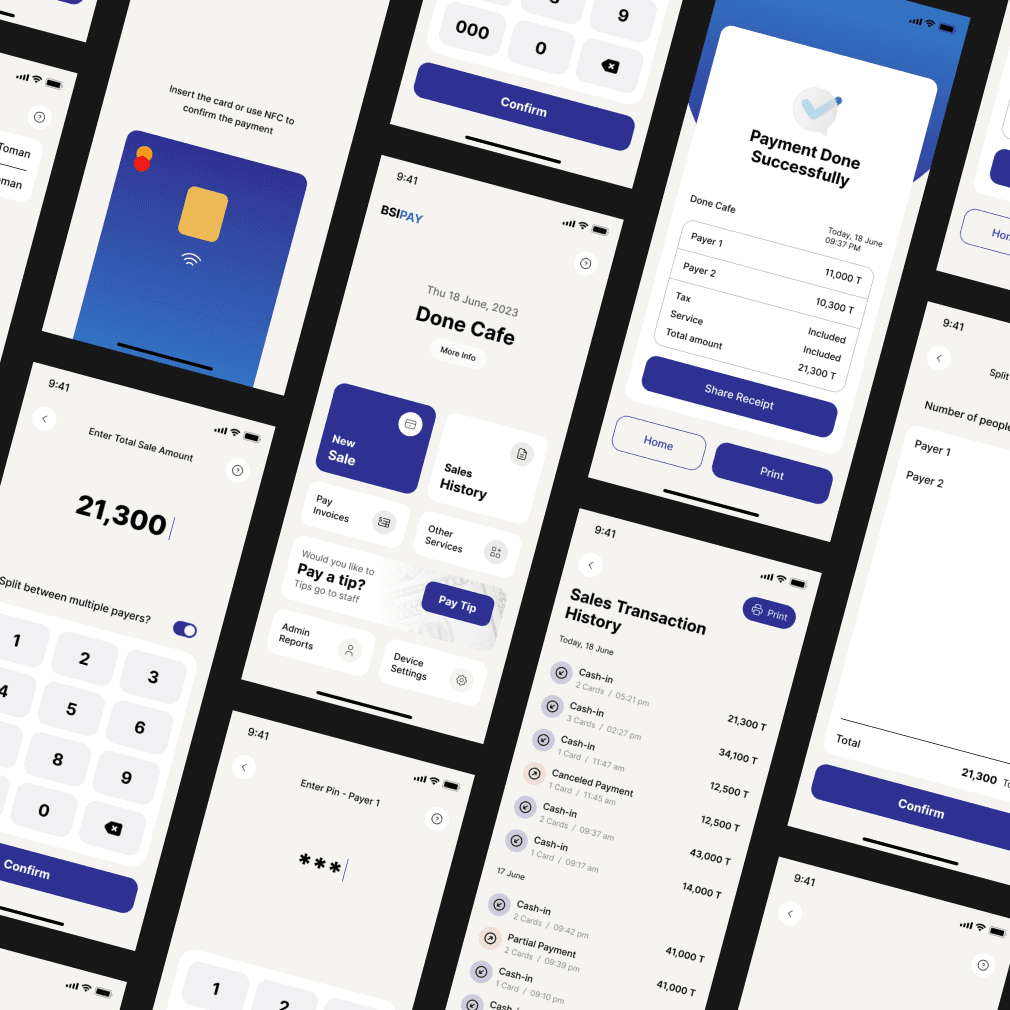
From 2 Weeks to 22 Hours: Redesigning Enterprise Onboarding With AI
SaaS / B2B Enterprise / Product Design
Redesigned Bettermode's enterprise onboarding from a 3-week manual process into an AI pipeline, transcript in, fully built community out. Onboarding time dropped from 2–3 weeks to under 22 hours, activation rate rose from 54% to 73%.
Company
Bettermode
All-in-one SaaS platform for building and managing online communities
Team
Moein Saboohi
Product Designer
Jacob Harris
Customer Experience Director
Ali Aghamiri
Solution Engineer
Disha Sareen
Customer Success Manager
Duration
August 2025 - January 2026
6 months
Softwares

Cursor

Vercel
Figma

Figjam
Overview
Bettermode is an all-in-one SaaS platform that lets companies build branded online communities for their customers. As the platform scaled to enterprise clients like HubSpot, Samsung, and Webflow, a critical bottleneck emerged: getting a new customer from signed contract to a live, well-designed community took 2–3 weeks and required significant manual effort from CX, design, and the customer themselves.
Over 18 months, I led the design evolution of this onboarding problem through three generations of solutions, from manual self-service, to templates, to a human-assisted design service, until I identified and shipped the root fix: an AI-powered pipeline that takes a client meeting transcript as input and generates a fully configured, production-ready community as output, using the Bettermode API. The manual design service was fully replaced.
Outcomes:
Enterprise onboarding time reduced from 2–3 weeks to under 3 days
CX documentation time cut by 75% (68 min → 17 min per client)
Customer activation rate increased by 35% in the first quarter post-launch
Design service capacity increased 4x without adding headcount
The Problem
Bettermode could build powerful communities, but customers couldn't experience that power fast enough to stay.
Enterprise clients signed contracts expecting a polished, branded community within days. What they got instead was a slow, fragmented process that required significant effort on both sides, and often broke down before the customer ever experienced the product's value.
The business consequence was clear: customers who didn't reach an active, well-designed community within their first two weeks were significantly more likely to churn before their first renewal. This wasn't a design polish problem. It was a structural bottleneck in how Bettermode delivered value to its most important customers.
The Evolution: Three Failed Attempts Before the Right Solution
Understanding why the AI pipeline was the right answer requires understanding what came before it. Each previous attempt solved part of the problem and created a new constraint.
Generation 1: Self-Service Setup
What we offered: Customers built their own community from scratch using Bettermode's editor tools.
What we observed: In analytics review of 200+ new signups over 6 months, only 31% of enterprise customers completed a basic community setup within their first 7 days. Exit surveys and churn interviews pointed to a consistent theme: customers understood what Bettermode could do, but couldn't translate that into a configured community that reflected their brand and use case without significant trial and error.
Support ticket data showed that setup and configuration questions accounted for 58% of all tickets in the first 30 days, the highest-volume category by a wide margin.
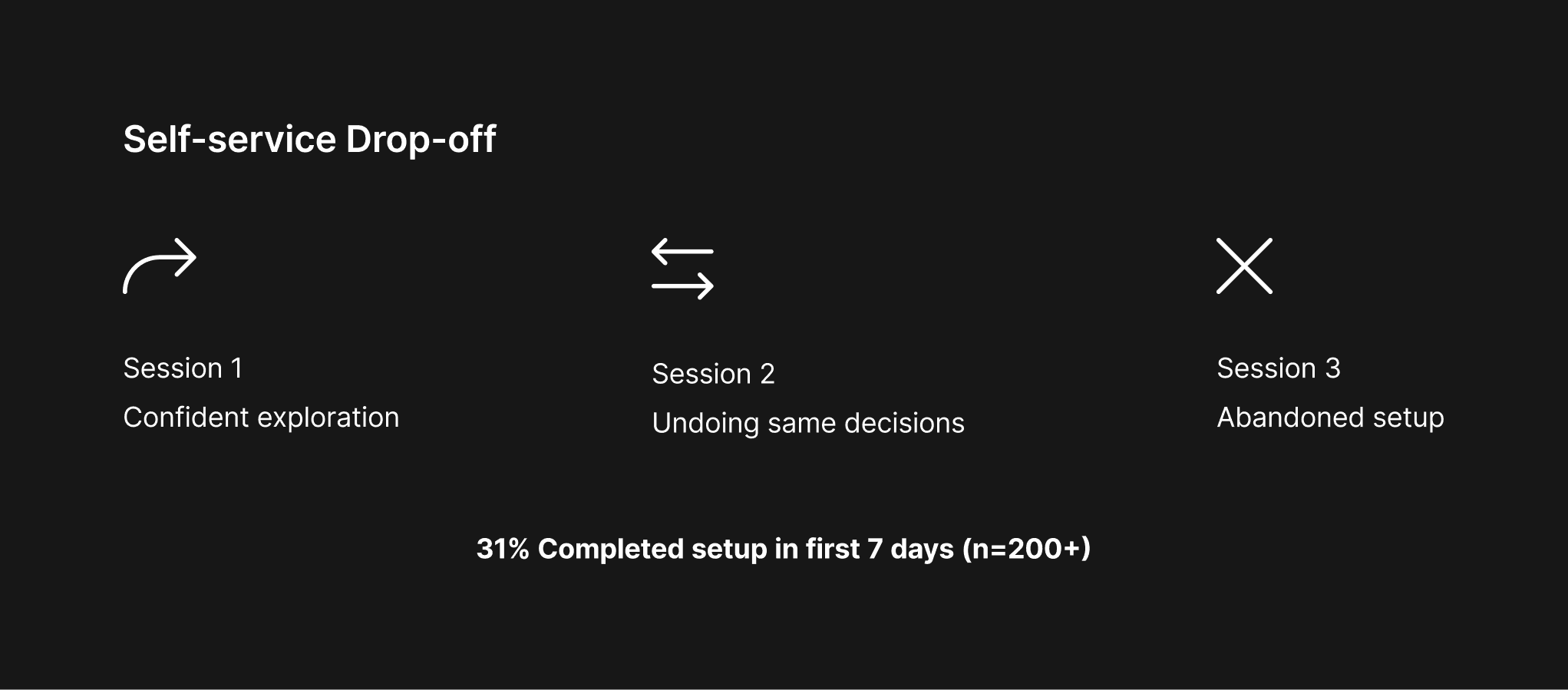
To understand where exactly customers were losing momentum, I reviewed session recordings from 15 enterprise clients during their first 7 days on the platform. The recordings showed a consistent drop-off pattern: customers would explore the editor confidently in the first session, then return for a second session and spend the majority of their time undoing and redoing the same layout decisions. The problem wasn't that they couldn't use the product, it was that they had no reference point for what "good" looked like for their use case. This finding directly shaped how we framed the template hypothesis: customers didn't need more features, they needed a starting point that reflected their type of community.
The constraint this created: Customers needed more guidance than a blank canvas could provide. But hand-holding every customer at scale wasn't viable.
Generation 2: Templates
What we offered: A library of 12 pre-designed community templates, built by our design team, that customers could select and customize.
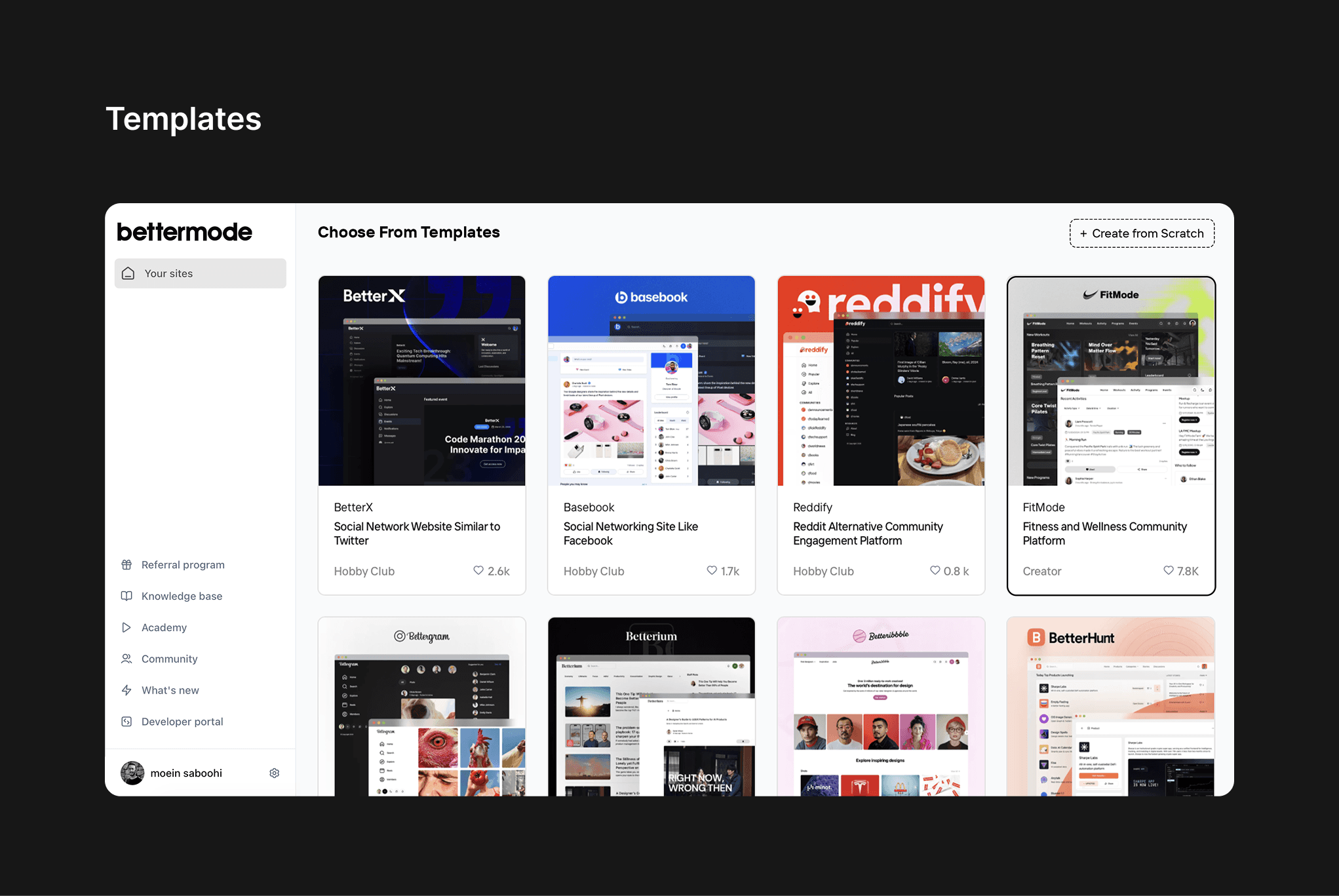
What improved: Small and mid-market customers responded well. Template adoption among SMB customers reached 74%, and support tickets related to initial setup dropped by 23% for that segment.
What broke: Enterprise customers, the highest-value segment, found templates too rigid. Their needs included specific brand guidelines, custom navigation structures, multiple audience segments, and enterprise-grade content architecture that no template could accommodate out of the box.
CX interviews with 8 enterprise clients revealed a consistent pattern: customers would start with a template, then spend 4–8 hours trying to reshape it into something that matched their brand and use case, often abandoning the effort and escalating to our support team. One client described it as "trying to renovate someone else's house instead of building your own."
The constraint this created: Enterprise clients needed a designed-for-them experience, not a designed-for-everyone template. This required human expertise in the loop.
Generation 3: Design Service (Human-Assisted)
What we offered: A dedicated design service for enterprise clients. CX specialists held discovery calls with clients, documented their requirements, and handed off structured briefs to our design team, who built the community from scratch.
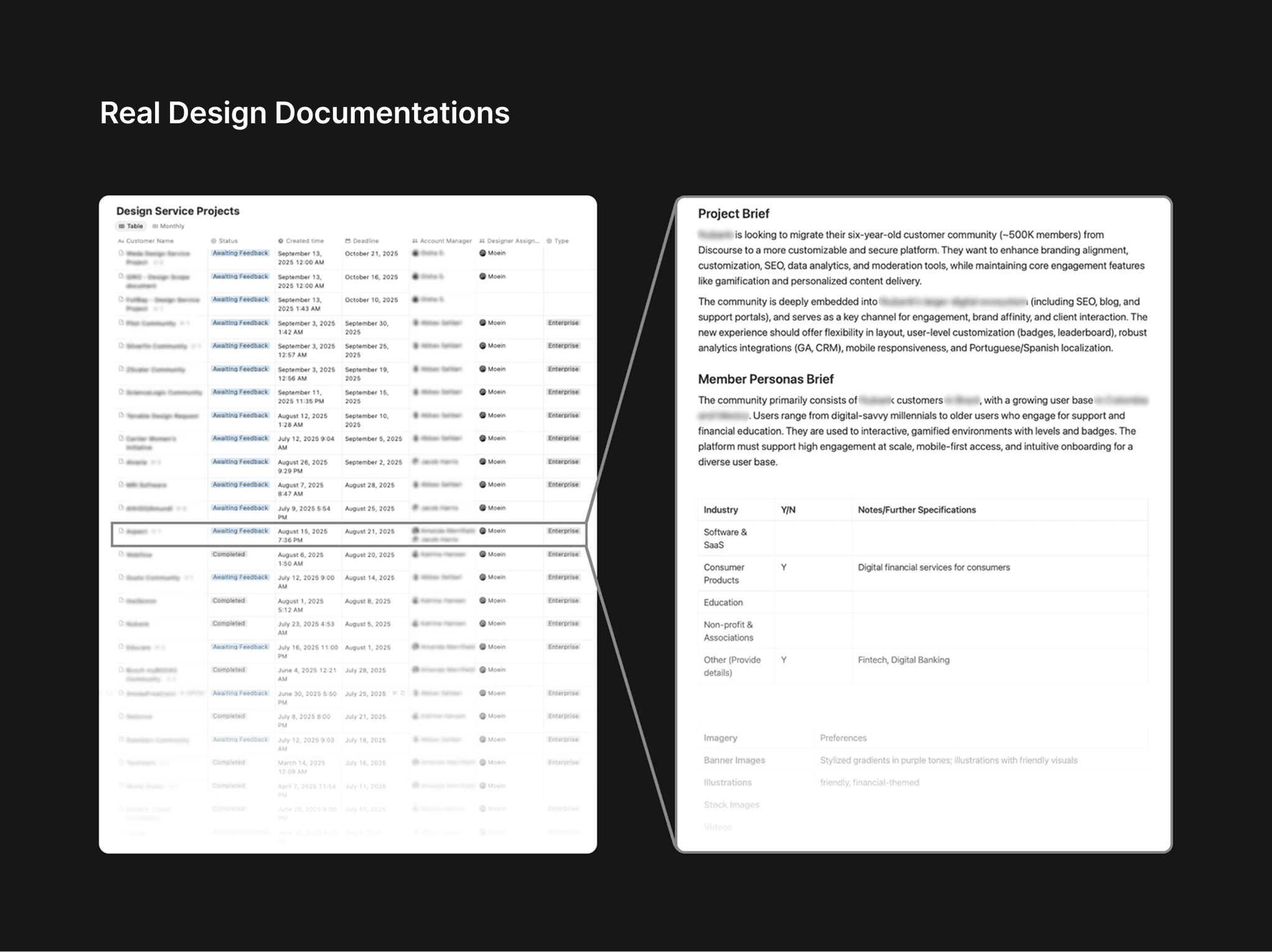
What improved: Enterprise satisfaction scores improved significantly. Clients received communities that genuinely reflected their brand. The design quality was high.
What broke, and what I was brought in to fix:
The design service introduced a new bottleneck: the documentation handoff between CX and Design. I audited 22 design briefs submitted over two months and interviewed 4 CX specialists to understand the failure points.
Research findings from the audit:
Issue | Frequency |
|---|---|
Missing brand identity details | 5 of 22 briefs (23%) |
Inconsistent section structure | 8 of 22 briefs (36%) |
Sent back to CX for clarification before design could begin | 9 of 22 briefs (41%) |
Average CX documentation time per client | 68 minutes |
From structured interviews with 4 CX specialists:
Every interviewee described spending 20–35 minutes post-call re-listening to recordings or re-reading notes just to reconstruct what had been discussed. The information existed, it just wasn't structured. Two CX specialists had built personal Notion templates as unofficial workarounds, which told me the problem was real, daily, and unsolved at a systems level.
The CX Director summarized it directly: "We're spending more time writing about the meeting than we spent in the meeting."
The deeper constraint this revealed: Even when we fixed the documentation problem, the design service still required a skilled designer to interpret the brief, make dozens of layout and configuration decisions, and build the community manually. This created a hard ceiling on how many enterprise clients we could serve simultaneously.
Reframing the Problem
After mapping all three generations, the pattern became clear. Each solution had tried to solve the symptom at each stage, blank canvas confusion, template rigidity, documentation inconsistency, without addressing the structural cause.
The real problem was this: Every generation of the onboarding process required humans to perform work that could be systematized, because the platform had no way to automatically translate a client's intent into a configured community.
The right question wasn't "how do we write better design briefs?" It was: "how do we eliminate the need for a design brief entirely?"
I mapped three possible directions:
Option 1: Improve the brief template: Mandatory structured fields, better prompts for CX. Low effort. I piloted this for 3 weeks with two CX specialists. Compliance improved slightly on structured fields, but qualitative sections, tone, audience goals, brand personality, remained inconsistent. The template reduced the symptom but didn't fix the bottleneck.
Option 2: Train CX on design principles: Workshop to help CX specialists understand what designers actually need. This improved brief quality among the two specialists who attended. But it didn't scale, and it didn't address the documentation time problem.
Option 3: AI-powered pipeline: Use the client meeting transcript as raw input. Extract structured requirements using LLM-based inference. Use the Bettermode API to automatically configure and generate the community based on those requirements. Eliminate the handoff entirely.
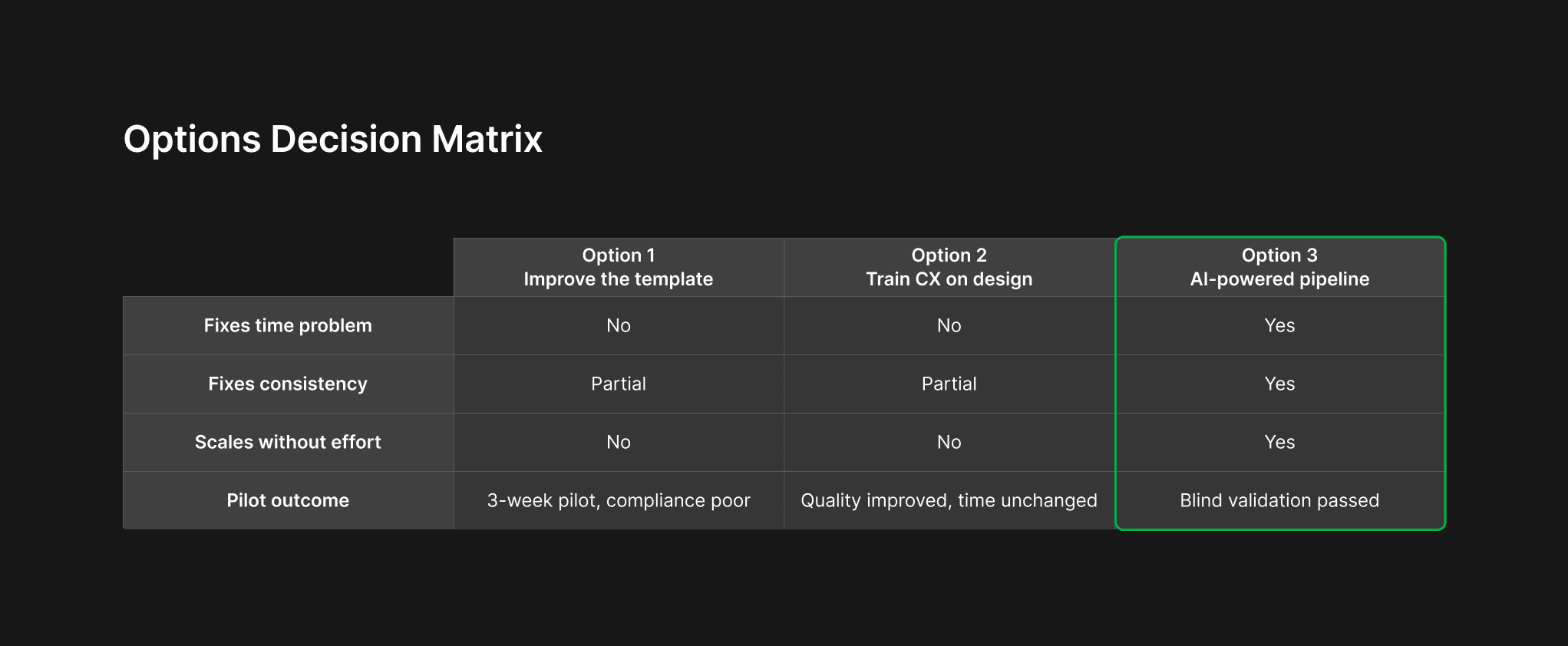
Option 3 required significantly more investment than Options 1 and 2. I needed to validate it before committing.
Validation Before Building
Before designing anything, I built a minimal functional prototype in approximately 4 days using Cursor AI, just enough to process a transcript and generate structured text output, with no interface.
I ran a blind validation test with the CX Director: I processed 8 real anonymized client transcripts through the prototype and asked him to review the AI-generated outputs alongside the manually-written briefs from the same calls, without knowing which was which.
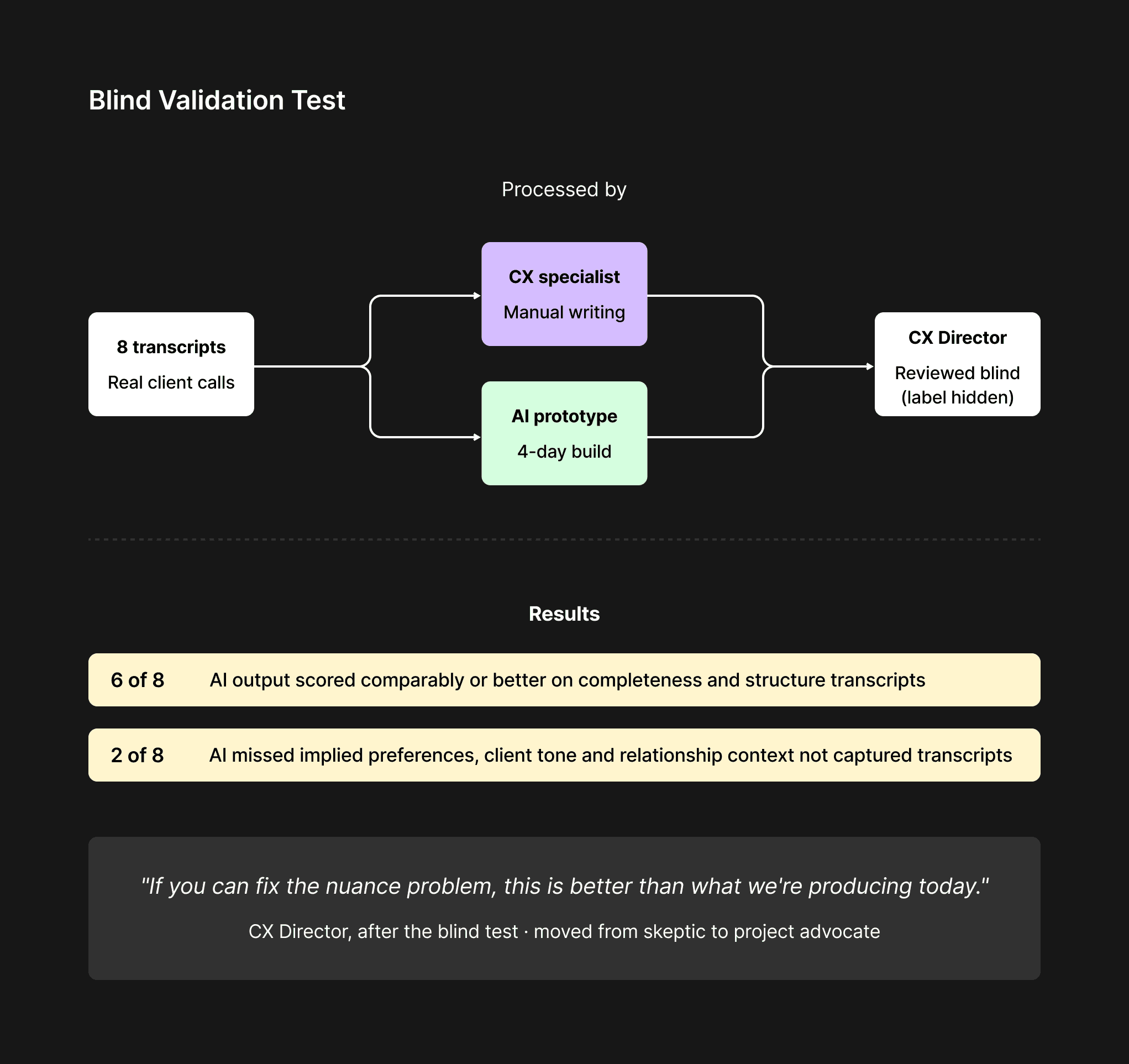
Results of the blind test:
AI outputs scored comparably or better on completeness in 6 of 8 cases
In 2 cases, the AI missed implied preferences that the CX specialist had picked up from tone and relationship context
The CX Director's overall assessment: "If you can fix the nuance problem, this is better than what we're producing today."
This feedback shaped two non-negotiable design decisions before a single screen was built:
A mandatory "context notes" field: CX enters relationship context and implied preferences before the transcript is processed, giving the AI the framing it needs for accurate inference
Human review as a genuine editing layer: the AI output is a strong first draft, not a final document; CX owns the review step
The CX Director moved from skeptic to the project's strongest internal advocate after this session.
Defining the Architecture
With validation complete, I aligned with the engineering lead on the system architecture before designing the interface. This session was the most important design decision in the project, terminology and data structure agreed here would be hard to reverse later.
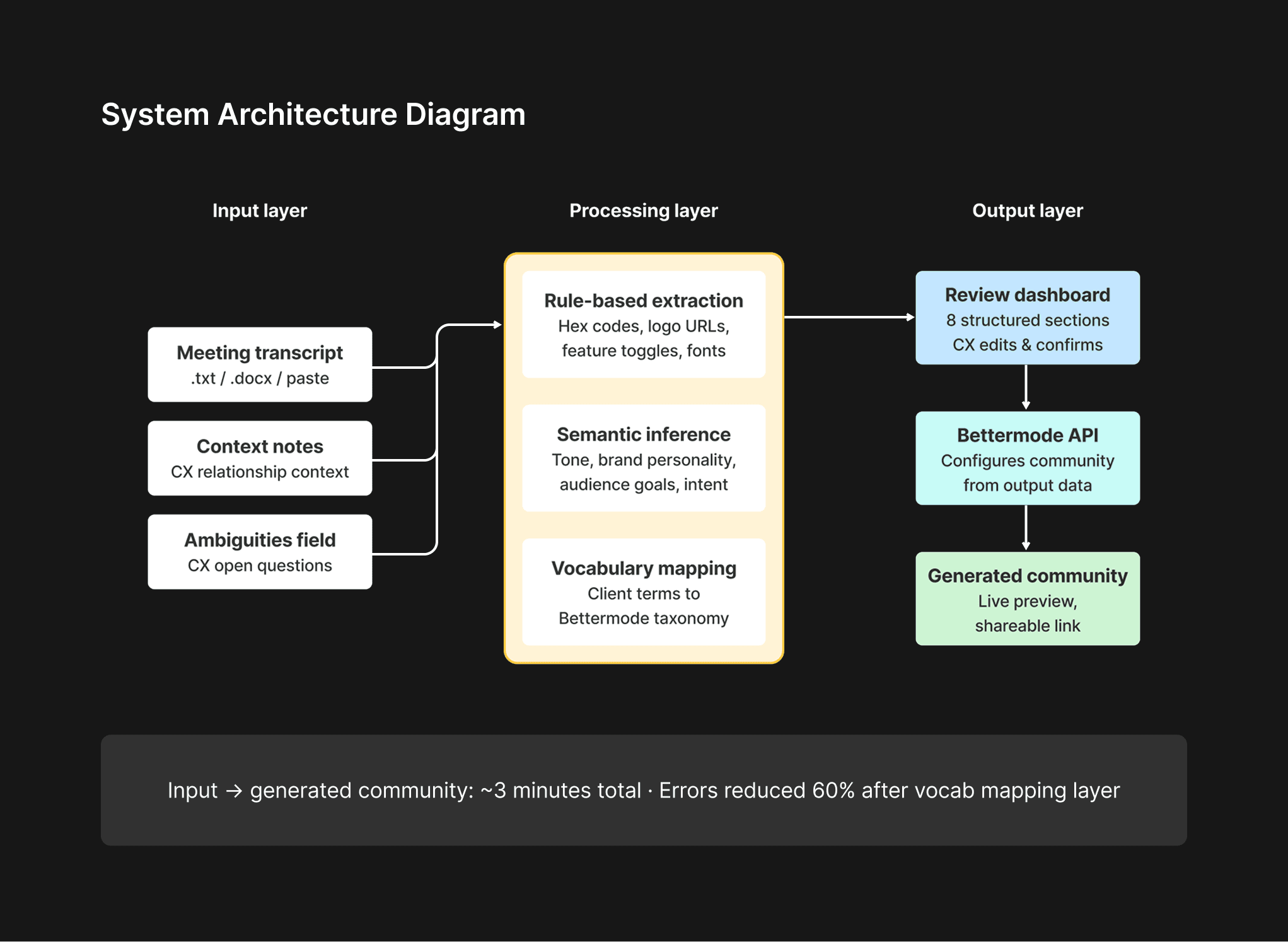
We defined three layers:
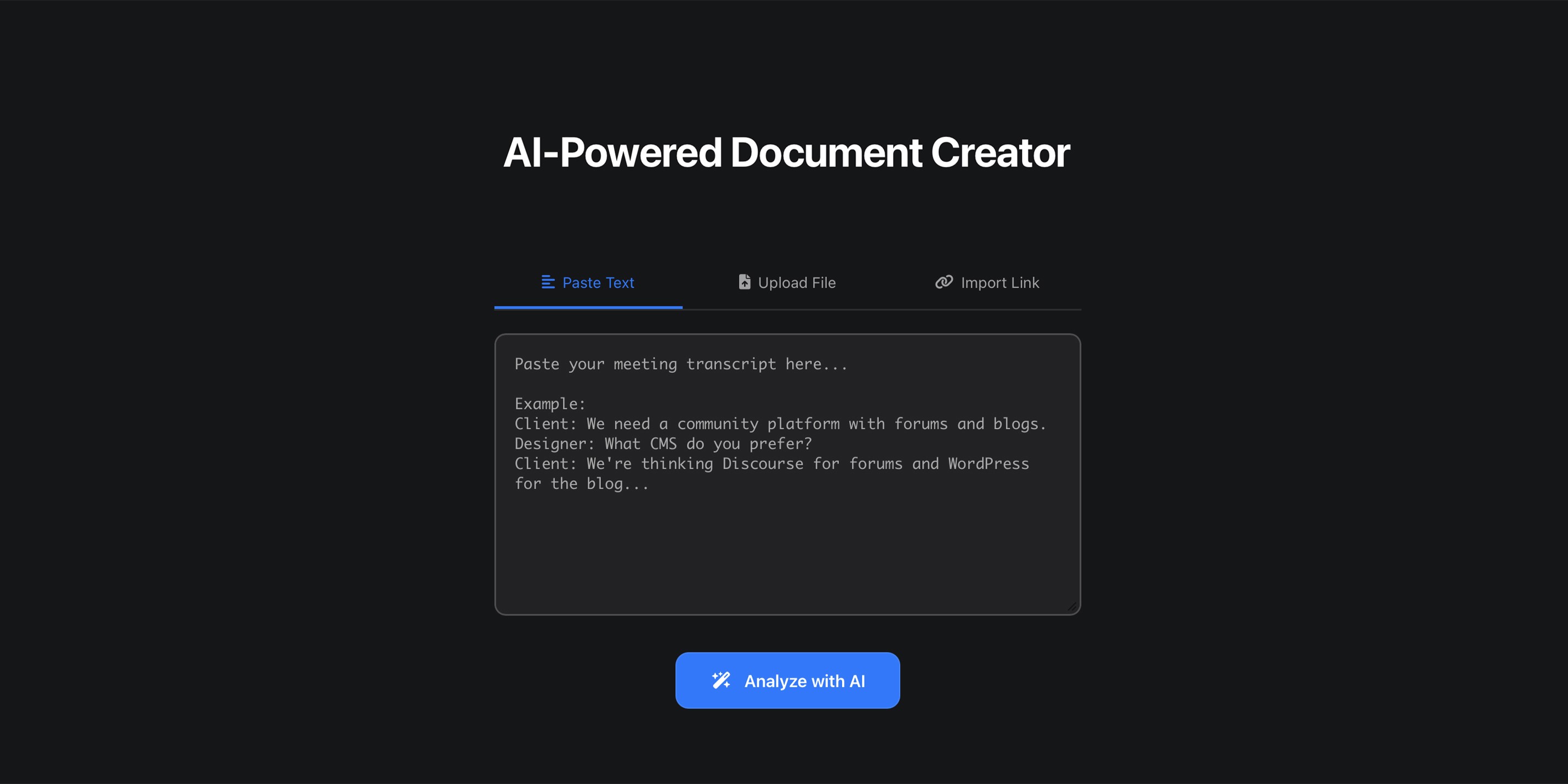
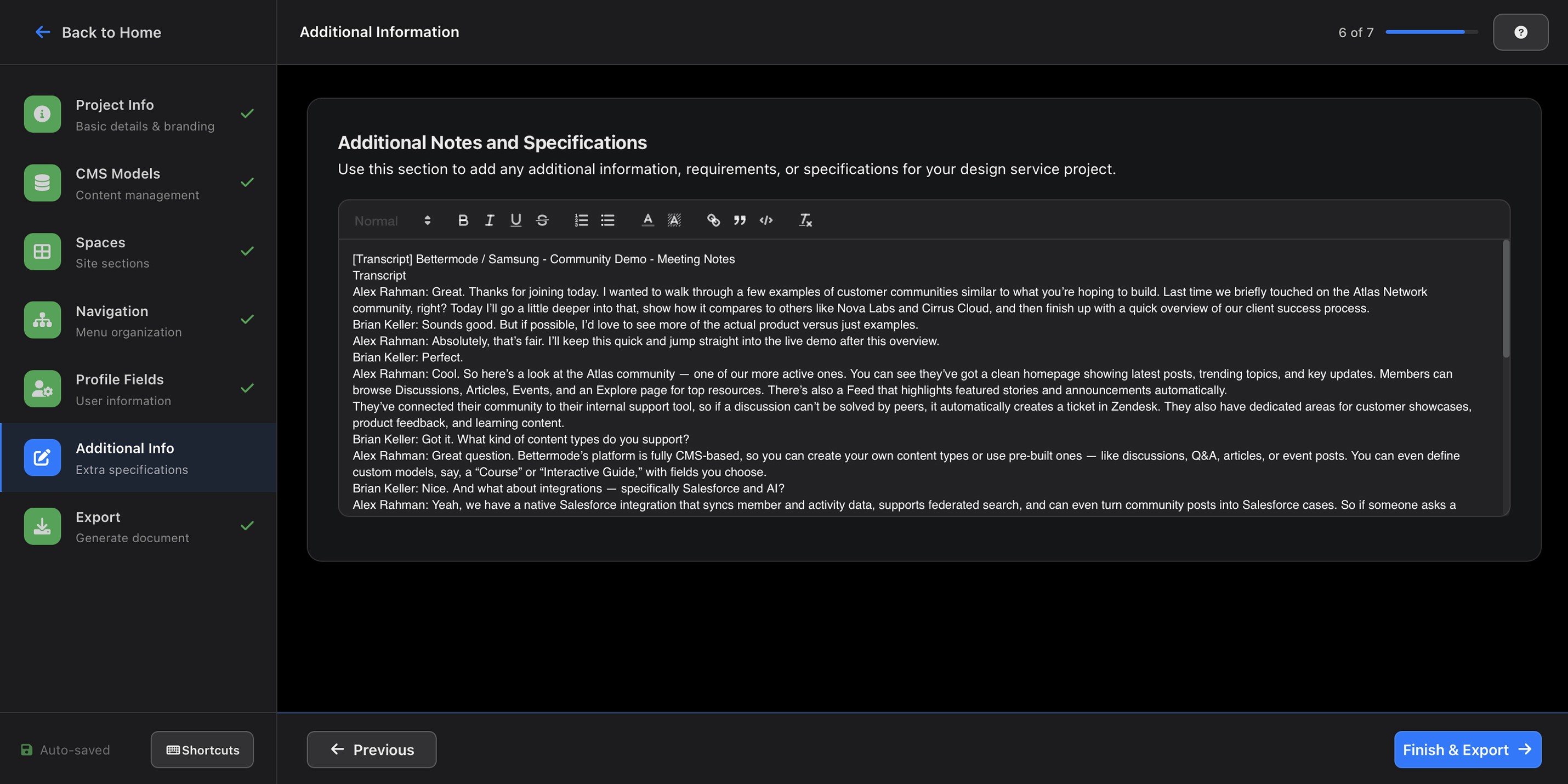
Input layer: Raw meeting transcript + CX context notes → fed to the LLM
Processing layer: Two-stage extraction, rule-based for structured data (hex codes, logo URLs, feature toggles) and semantic inference for qualitative data (tone, brand personality, audience goals)
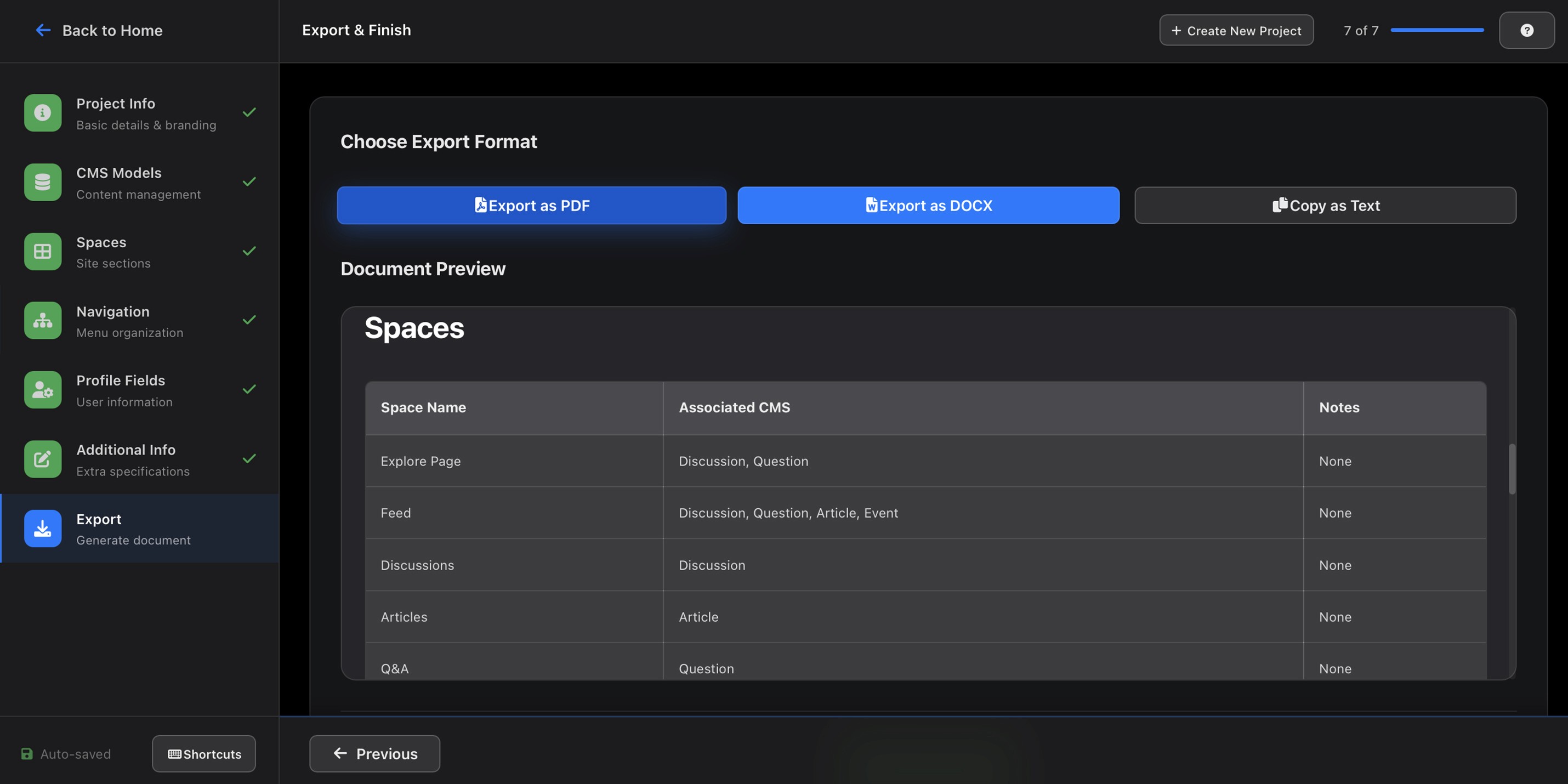
Output layer: Bettermode API calls that configure and generate the community directly, not a document to be interpreted, but a live community to be reviewed
One critical architectural decision: the system needed to map client vocabulary to Bettermode's internal taxonomy automatically. Early testing showed that when clients used their own terms ("hubs," "rooms," "boards") rather than Bettermode's ("spaces," "collections," "channels"), the AI misclassified content. We built a terminology mapping layer that reduced this error category by 60%.
User Flows
I designed for three distinct users, each with different needs from the same system:
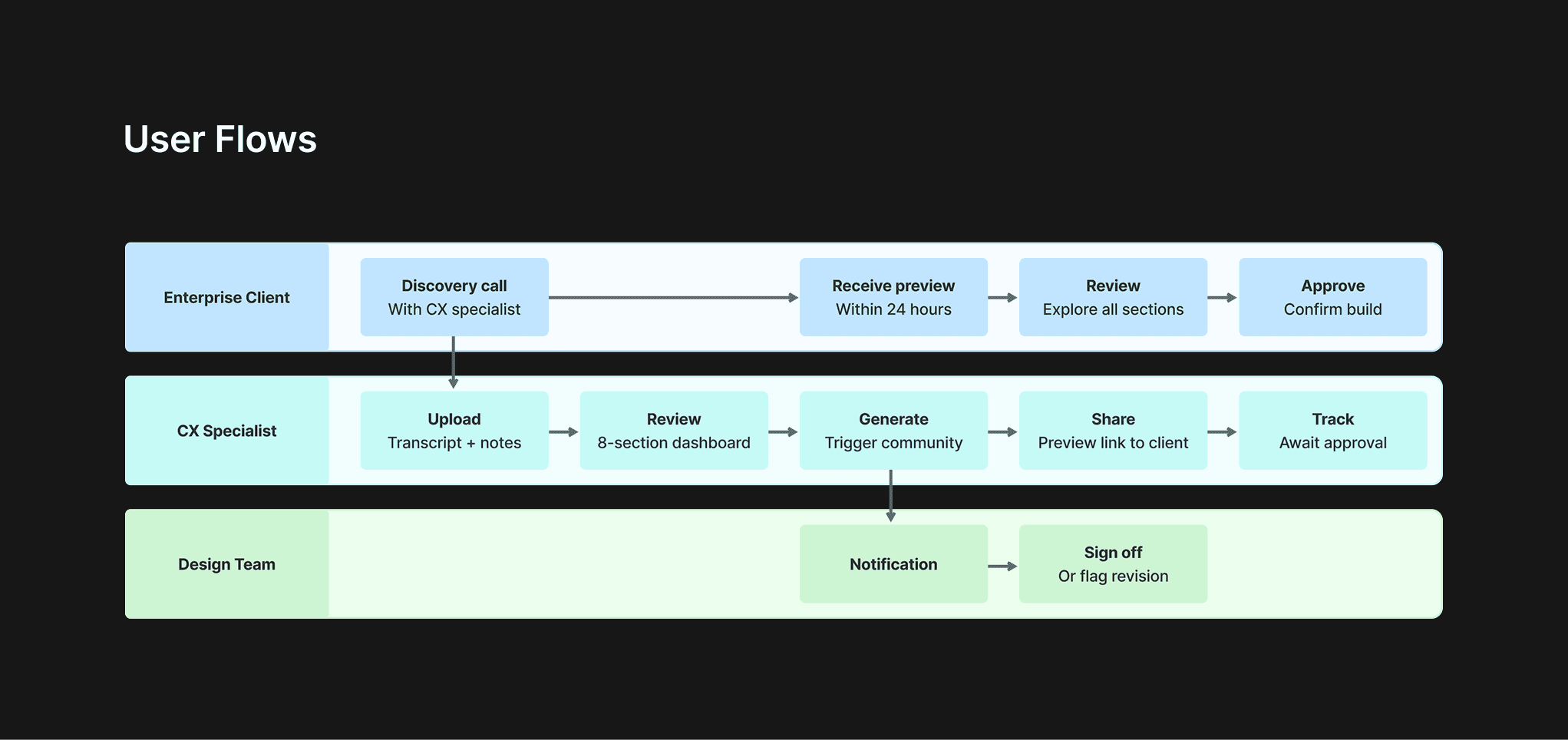
CX Specialist flow: Upload transcript → add context notes → review AI-extracted requirements → confirm or edit → trigger community generation → approve final output
Design Team flow: Receive notification → review generated community → flag edge cases → sign off or request revision
Enterprise Client flow: Attend discovery call → receive preview link within 24 hours → review and request adjustments → go live
The client flow was the most important to get right, the speed of delivery (same day or next day) was the primary value proposition, and any friction in the review-and-approve step would erode that advantage.
Prototyping
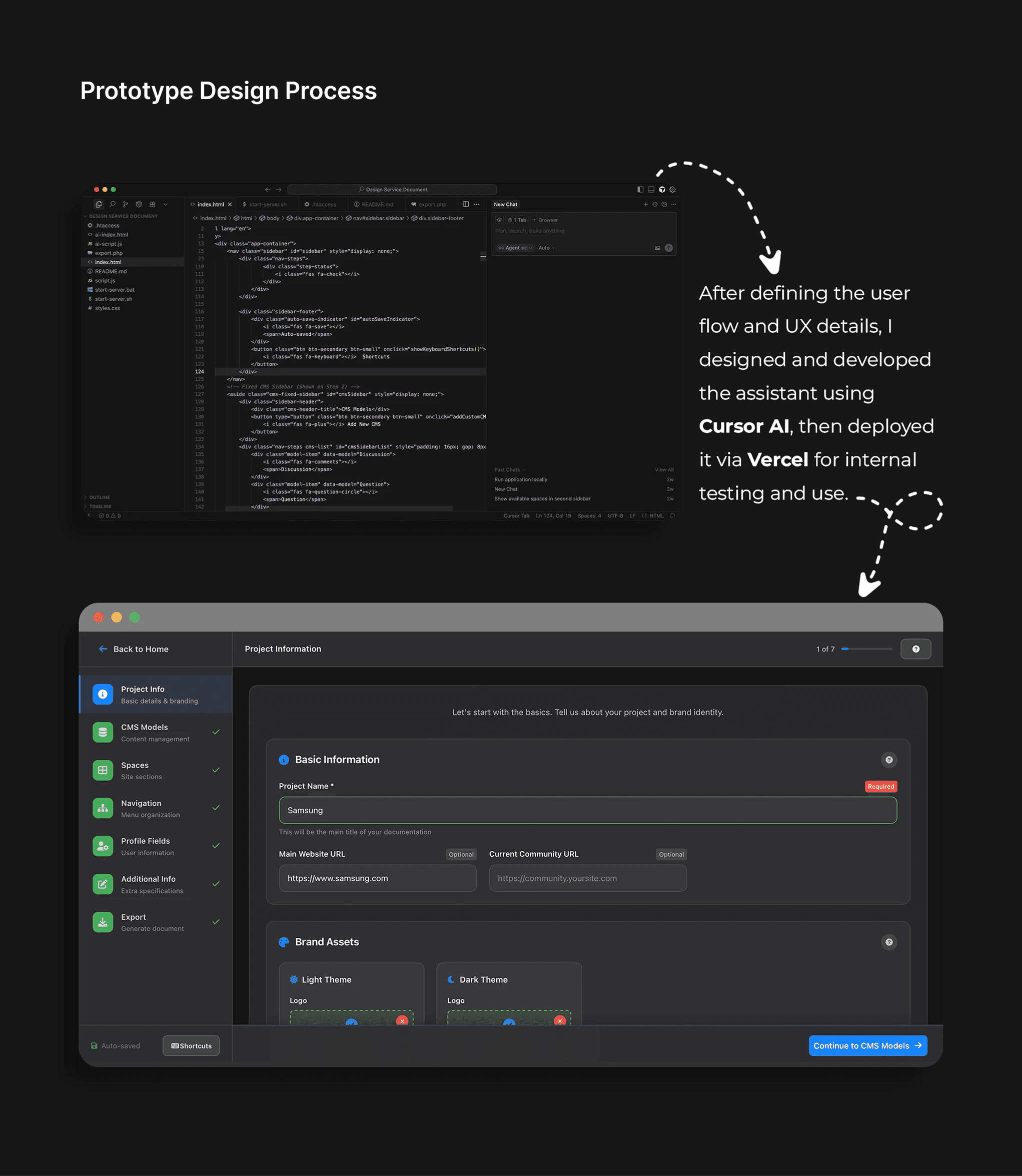
I built the interface in Figma with high-fidelity prototypes for each user flow, then implemented using Cursor AI and Vercel for functional testing.
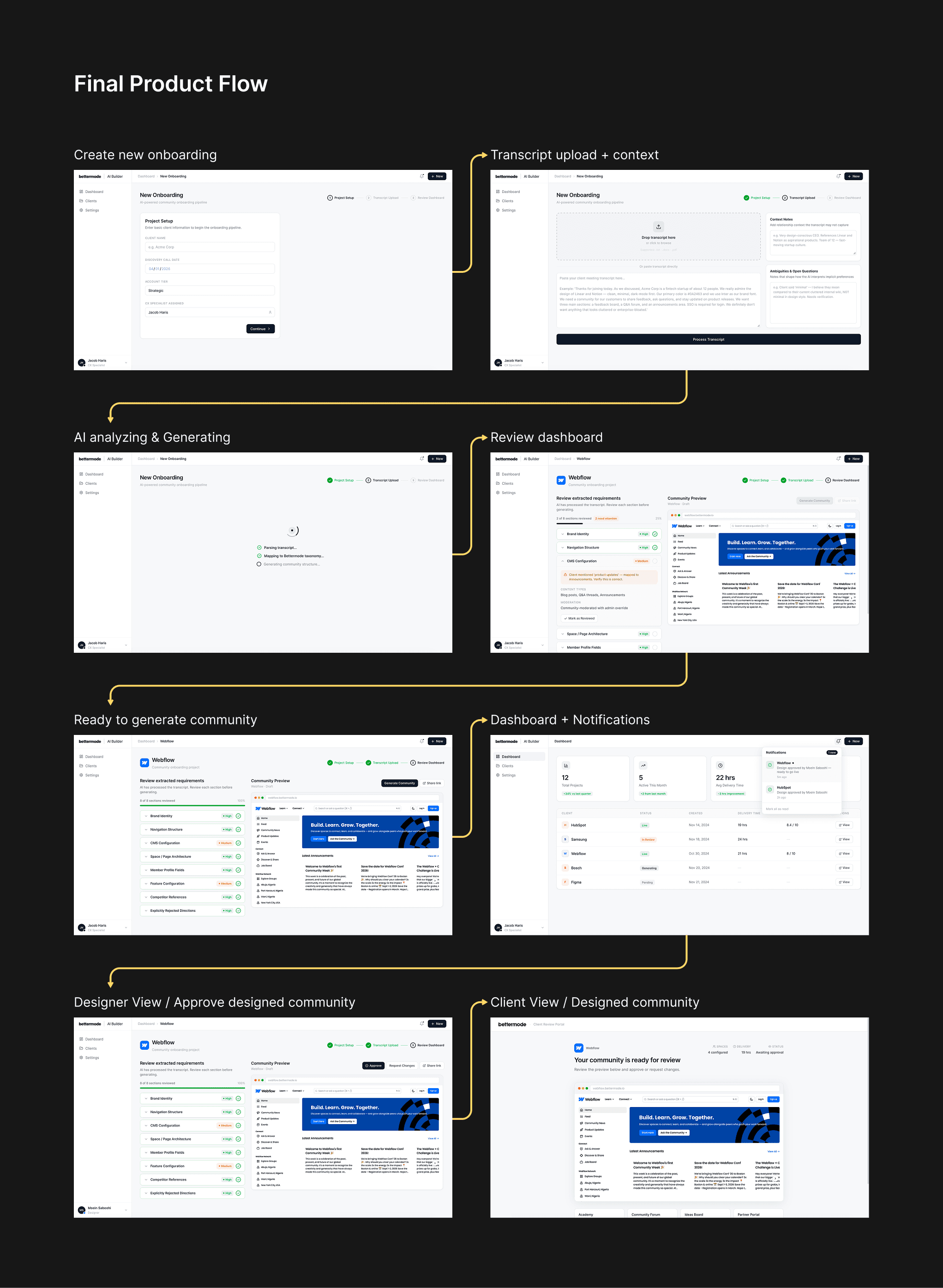
Interface structure:
Transcript input screen: Single upload or paste field + context notes panel. Deliberately minimal, the less CX had to do before processing, the better.
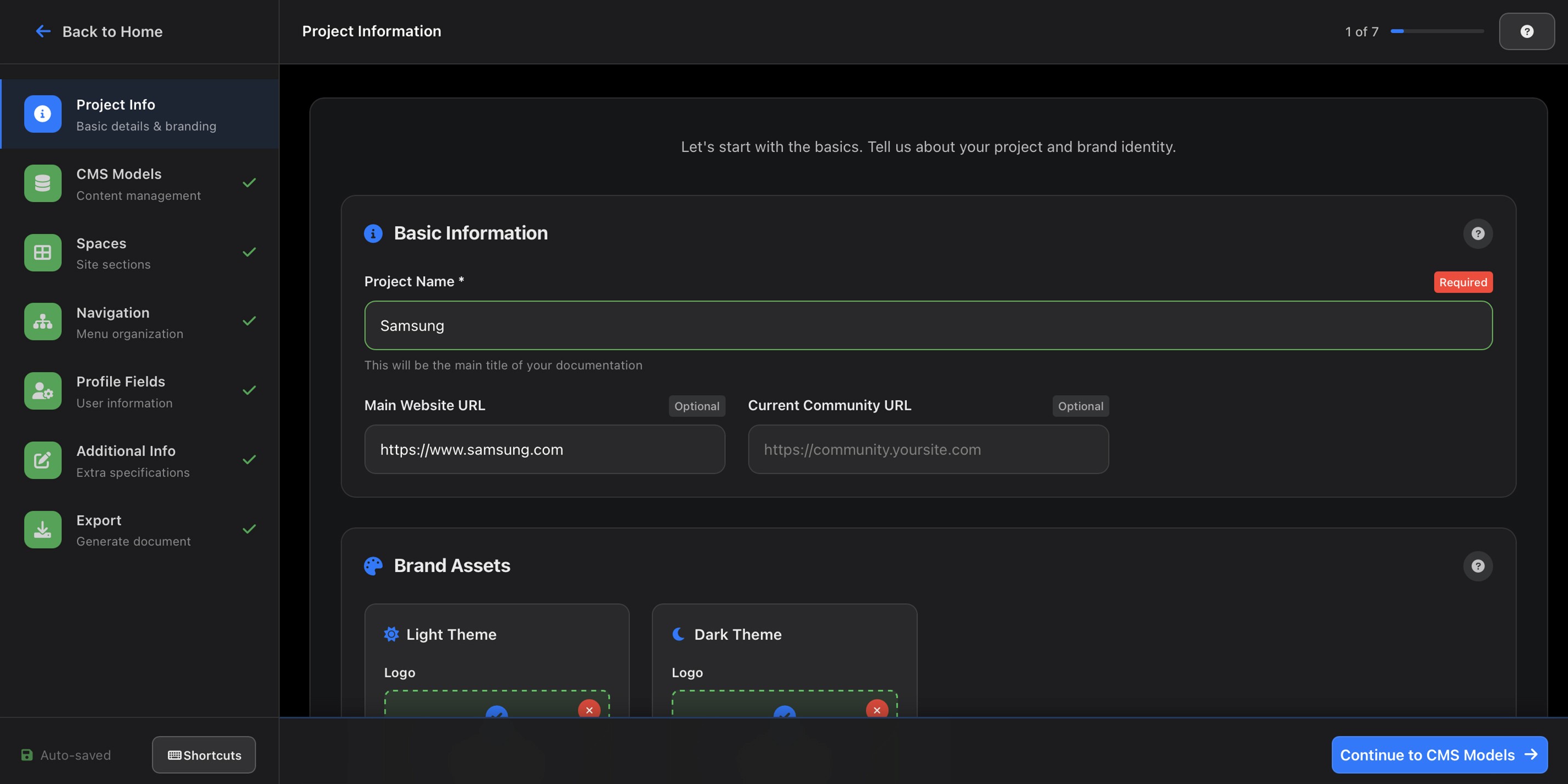
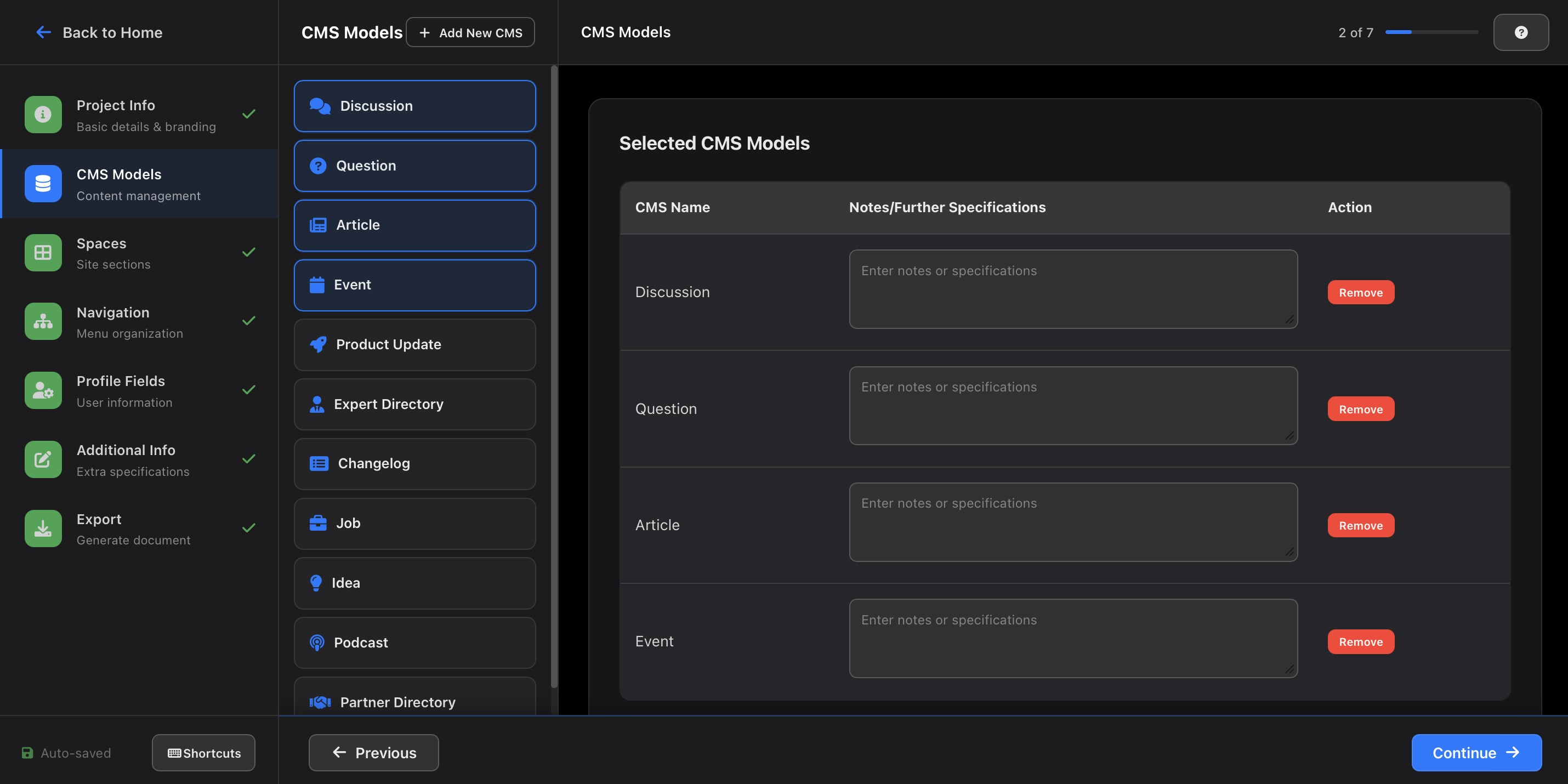
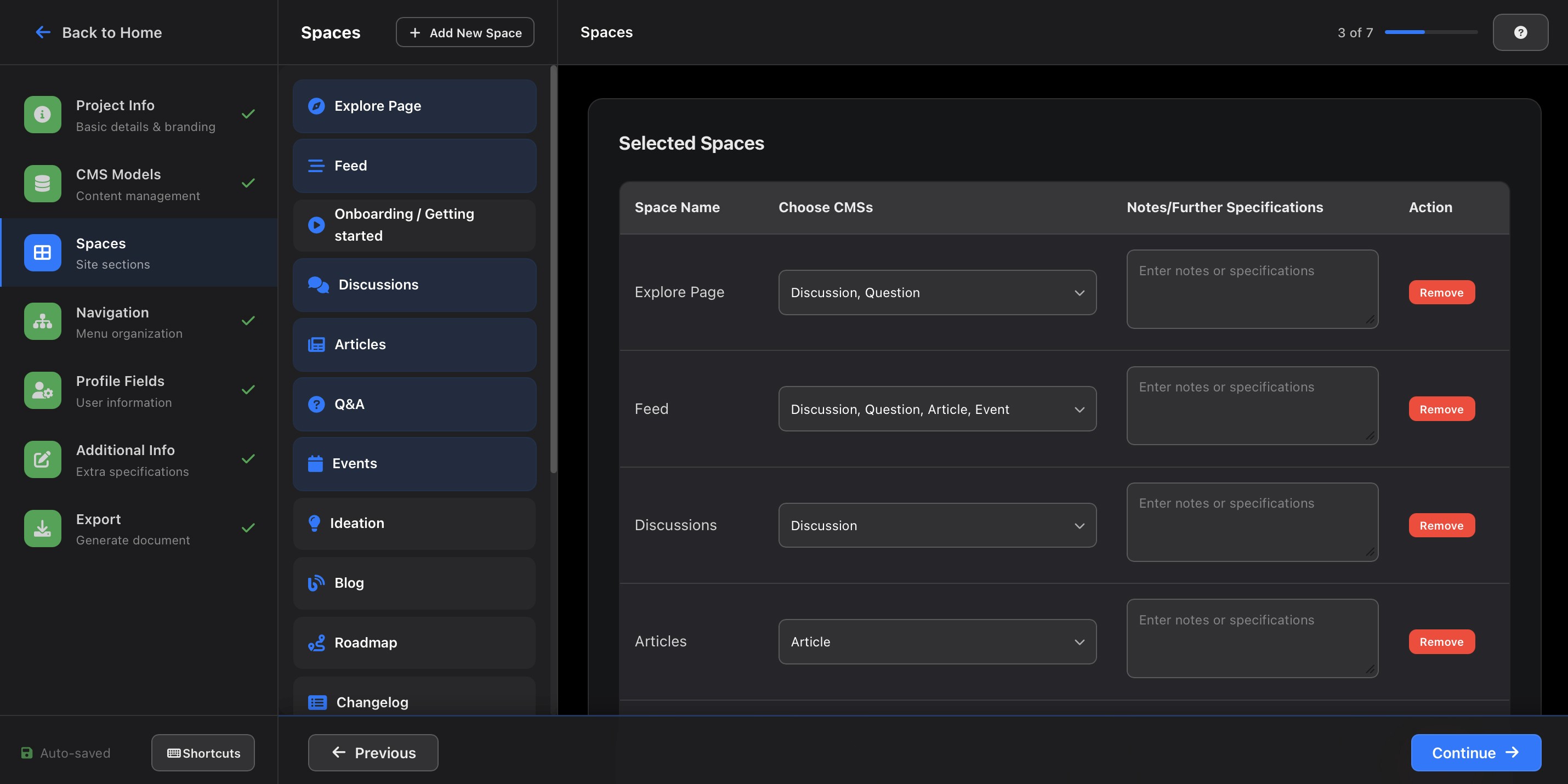
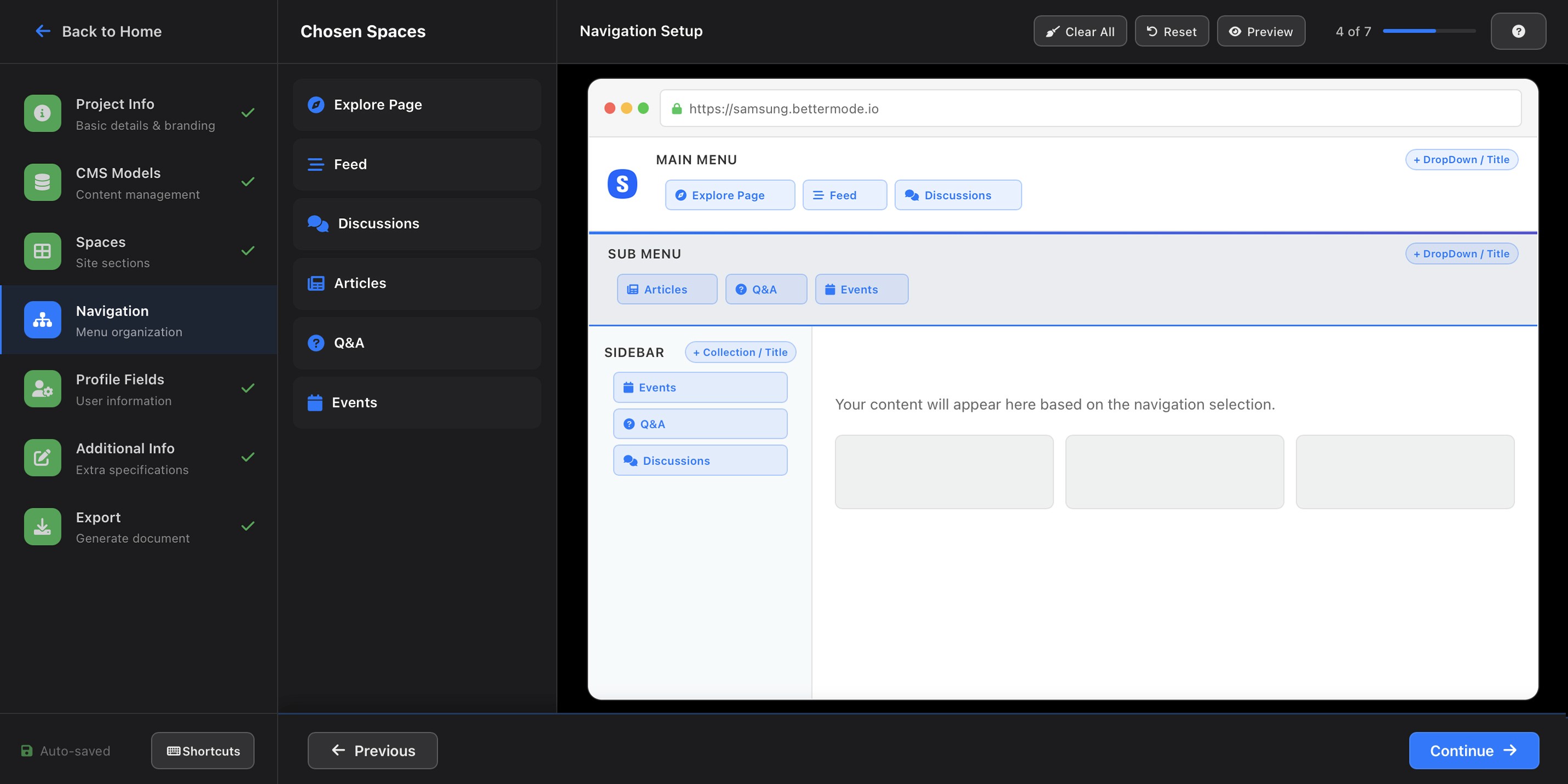
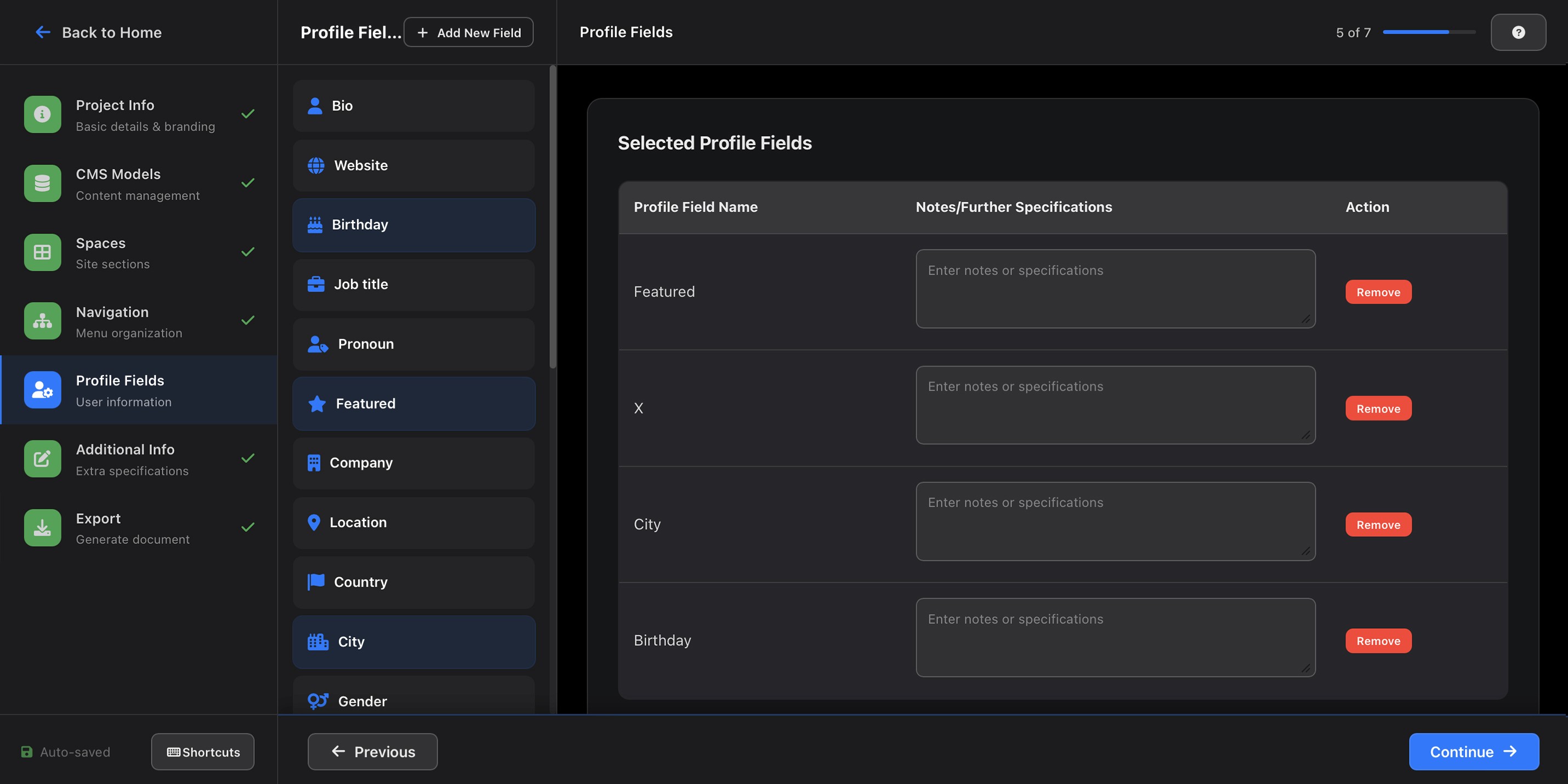
Review dashboard: Extracted requirements displayed in 8 structured sections:
Brand Identity (colors, fonts, logo)
Navigation structure
CMS configuration (content types, categories, moderation settings)
Space/page architecture
Member profile fields
Feature configuration
Competitor references (added based on CX feedback, one of the most referenced sections post-launch)
Explicitly rejected directions (added after a facilitation session revealed designers relied heavily on knowing what not to do)
Community preview: Live Bettermode environment generated directly from the output, accessible via shareable link, reviewable without logging in.
A naming decision from a facilitation workshop proved important: what I had called "Spaces" in the output structure, CX called "Sections" in client conversations. We aligned on terminology before build began, which prevented a category of confusion downstream.
Implementation
With prototypes validated internally and the architecture aligned, I worked directly with Ali Aghamiri (Solution Engineer) to move into build. My role through implementation was to ensure the design intent survived the transition to code, a gap that had caused problems in the design service's previous manual workflow.
I structured the handoff around three priorities:
Specification over description. Rather than handing over Figma files alone, I documented each of the 8 review dashboard sections with explicit field-level logic, what confidence threshold triggered each indicator color, what "mandatory review" meant in terms of blocking the generate button, and how the vocabulary mapping layer should surface mismatches to the CX specialist visually. Ambiguity in these decisions would have produced inconsistent behavior across edge cases.
Weekly design QA sessions. Throughout the 6-week build cycle, I ran weekly reviews of the live build against the prototype. The most significant implementation gap caught early: the confidence indicator system was rendering amber for all fields that contained inferred data, regardless of actual confidence score, a logic error that would have flooded CX specialists with false warnings. Catching it at week 2 rather than post-launch saved a full iteration cycle.
Iterating in code, not just Figma. Several interaction decisions, particularly how the review dashboard responded when a CX specialist edited an AI-extracted field, were cleaner to resolve in the live build than in prototype. I worked directly in the browser alongside the engineer for these micro-interactions rather than producing updated specs for each one.
The community generation step, using the Bettermode API to configure and populate a live community from the structured output, was built entirely by Ali, with my involvement limited to defining the visual quality threshold: what a generated community needed to look like before it was shareable with a client.
Testing
Round 1: Internal usability testing (CX team, n=4)
Focus: Extraction accuracy and review experience
Method: Each CX specialist processed 3 real anonymized transcripts. I observed sessions and collected think-aloud feedback.
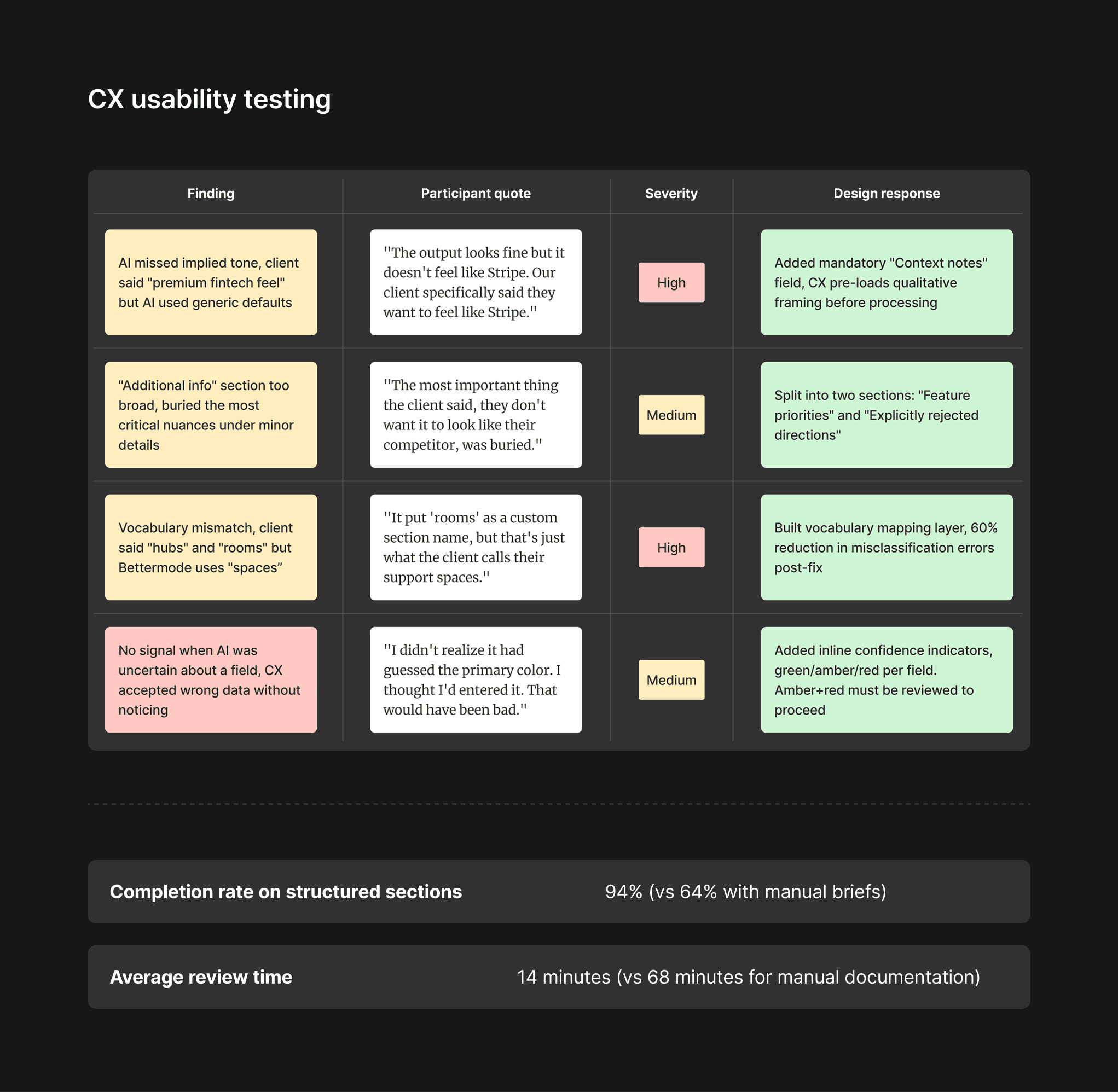
Completion rate on structured sections: 94% (vs 64% with manual briefs) Average review time: 14 minutes (vs 68 minutes for manual documentation)
Round 2: Community generation testing (Design team, n=3)
Focus: Quality of AI-generated communities, were they genuinely usable as a starting point, or did they require near-complete rebuilds?
Method: Designers reviewed 6 AI-generated communities against their brief and rated each on three dimensions: brand accuracy, structural correctness, and completeness of configuration.
Results:
Dimension | Average score (1–5) |
|---|---|
Brand accuracy | 4.1 |
Structural correctness | 4.4 |
Completeness of configuration | 3.8 |
Main finding: Completeness was the weakest area, primarily because clients often referenced features they expected but didn't explicitly request during the call. We addressed this by adding a "standard enterprise defaults" layer to the generation logic, pre-configuring features commonly requested by enterprise clients unless explicitly excluded.
Round 3: Beta with 5 enterprise clients (live environment)
Focus: Real-world speed and quality vs the previous design service. Before beta began, I defined client-facing success metrics in advance, time from discovery call to preview, client satisfaction score, number of revision rounds, and activation rate in the first 14 days, so we had a clear baseline to measure against from day one.
Method: 5 new enterprise clients onboarded using the AI pipeline instead of the manual design service. CX specialists facilitated as normal. Clients received a preview link within 24 hours of their discovery call.
Results:
Metric | Manual design service | AI pipeline |
|---|---|---|
Time from discovery call to preview | 8–14 days | 18–26 hours |
Client satisfaction score (1–10) | 7.4 | 8.1 |
Number of revision rounds before approval | 2.3 average | 1.6 average |
CX time per client (documentation + coordination) | 68 min | 17 min |
Alongside the quantitative tracking, I ran observed walkthrough sessions with 3 of the 5 beta clients to understand how they reviewed and responded to the preview link, the most critical moment in the client experience. Each session was conducted remotely via screen share, with the client navigating the preview independently while I observed without prompting.
Client usability findings:
Observation | Frequency | Design response |
|---|---|---|
Clients navigated preview confidently without instruction | 3 of 3 | Confirmed minimal onboarding copy was sufficient |
Clients unsure how to submit revision requests | 2 of 3 | Added a persistent "Request changes" CTA visible at all times in preview |
Clients wanted to share preview with internal stakeholders before approving | 3 of 3 | Made shareable link available without login requirement |
One client confused "approve" with "go live", hesitated to click | 1 of 3 | Renamed button to "Approve for final build" and added a confirmation step |
The session with the client who hesitated on "approve" was the most valuable, it revealed that the stakes felt high enough that a single ambiguous label created real friction. A naming change and one extra confirmation step resolved it completely.
One finding I didn't expect: clients who received a preview within 24 hours were more engaged in the revision process, not less. The speed signaled competence and created momentum. Several clients commented unprompted that the speed of delivery was a reason they felt confident in the partnership.
Iterations After Launch
The most significant post-launch iteration was triggered by a failure, not a feature request.
Three weeks after full launch, a CX specialist submitted a transcript from a client who had described wanting a "clean, minimal community", but who meant minimal compared to their current bloated internal wiki, not minimal in the design sense. The AI generated a sparse, low-feature community that missed the client's actual intent entirely.
This wasn't an AI failure. It was a process gap, no tool can catch deliberate imprecision or contextual nuance the CX specialist didn't surface. We responded by adding a mandatory "ambiguities and open questions" field to the context notes step, giving CX a structured place to flag their own uncertainties before processing.
This field became one of the most valued parts of the workflow by the design team, precisely because it surfaced what the transcript couldn't.
Outcome
The AI pipeline fully replaced the manual design service within 6 weeks of launch.
Metric | Before | After |
|---|---|---|
Enterprise onboarding time | 2–3 weeks | Under 3 days |
Customer activation rate (first 14 days) | 54% | 73% (+35%) |
CX documentation time per client | 68 min | 17 min (−75%) |
Brief follow-up rate (needed clarification) | 41% | 18% |
Design service capacity (clients/month) | ~8 | ~32 (4x) |
Beyond the numbers: the design team shifted from spending the majority of their time on production work (building communities to spec) to higher-leverage work, reviewing and refining AI outputs, improving the generation logic, and working on product design for the platform itself.
What I Would Do Differently
Start the architecture conversation earlier. The terminology mapping layer, aligning client vocabulary to Bettermode's internal taxonomy, was a late discovery that required a non-trivial engineering effort near the end of the project. I should have identified vocabulary mismatches as a design risk in the discovery phase and designed for it from the start.
Build the "ambiguities" field from day one. It was added after a failure. The insight that humans hold contextual knowledge the transcript doesn't capture was available from the very first CX interview, I just didn't translate it into a design requirement early enough.
Push for full API coverage earlier. Several client configuration options, custom domain setup, SSO integration, and advanced member field types, weren't yet fully exposed in the Bettermode API at the time of build, which meant edge cases for more complex enterprise clients still required a small amount of manual configuration. Working more closely with engineering to accelerate API coverage would have made the pipeline fully self-contained sooner.
Key Insights
The right level of automation is not "fully automated." The system works because humans are still in the loop, at the context notes step, at the review step, and at the approval step. Removing those touchpoints in the name of efficiency would have degraded quality and trust. The design challenge was deciding which human effort to eliminate and which to preserve.
Workarounds are always the most honest design brief. At every generation of this problem, from customers abandoning self-service setup, to CX specialists building personal Notion templates, the workarounds told me exactly what the system was failing to provide. I learned to treat workarounds as research artifacts, not edge cases.
Speed of delivery changes the relationship. Clients who received their community preview within 24 hours behaved differently, more engaged, more decisive, more trusting, than clients who waited 2 weeks. Design decisions that reduce time-to-value don't just improve metrics; they change the nature of the customer relationship.