AI Assistant for Design Documentation
SaaS / No-Code Platform / Product Design
Designed and developed an AI assistant that extracts design requirements from meeting transcripts, reducing manual work and ensuring structured documentation.
Company
Bettermode
All-in-one SaaS platform for building and managing online communities
Team
Moein Saboohi
Product Designer
Jacob Harris
Customer Experience Director
Ali Aghamiri
Solution Engineer
Disha Sareen
Customer Success Manager
Amir Khalili
Creative Director
Duration
August 2025 - October 2025
2 months
Softwares

Cursor

Vercel
Figma
Figjam
Overview
BetterMode offers a Design Service for enterprise clients such as HubSpot, Samsung, Bosch, and Webflow, providing fully customized community designs.
This process required extensive design documentation based on client branding, audience personas, and feature needs collected by the CX (Customer Experience) team.
Previously, this documentation was manually compiled, often incomplete, and caused communication friction between CX and Design.
To address this, I developed an AI-powered assistant that converts CX meeting transcripts into structured, complete, and ready-to-use design briefs.
The Problem
Manual and inconsistent documentation slowed collaboration between CX and Design teams.
The CX team spent significant time rewriting notes and transcripts from client meetings into design briefs. The process was error-prone, inconsistent, and often incomplete, requiring frequent clarifications between teams. This inefficiency delayed project timelines and added unnecessary cognitive load on both CX and Design sides.
Research
Before designing anything, I needed to understand the actual scope of the problem, not just the surface complaint that 'documentation takes too long.'
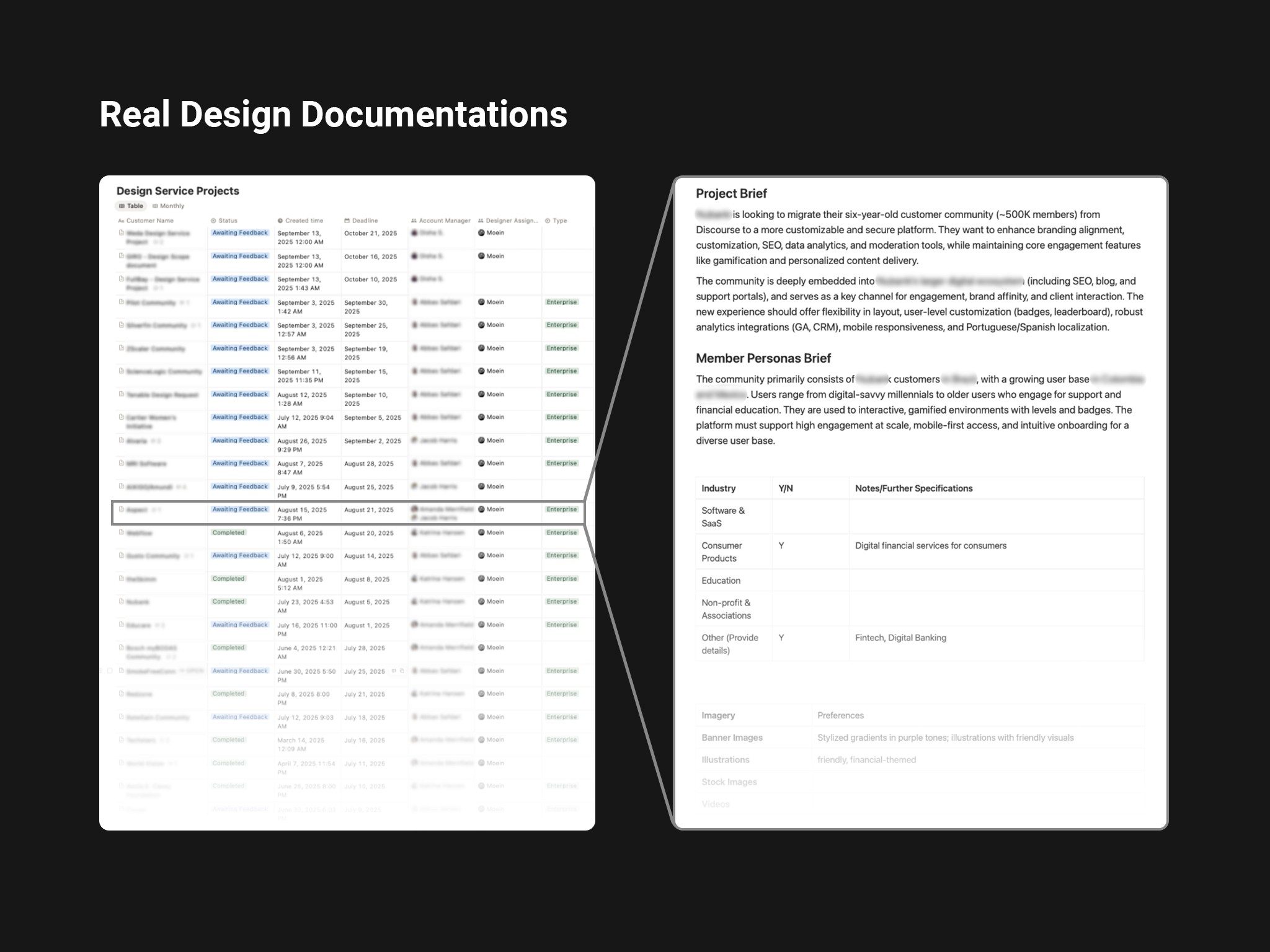
I conducted informal structured interviews with 4 CX team members, asking each to walk me through their last two client onboarding calls step by step. I also collected and reviewed 11 existing design requirement documents submitted to the design team over the past two months, categorizing them by completeness, structure consistency, and the number of follow-up questions they generated.
Key findings:
In every interview, CX members described spending a significant portion of post-call time re-listening to recordings or re-reading notes just to reconstruct what was discussed, the raw information existed, but extracting and organizing it was the bottleneck.
Of the 11 documents reviewed, 3 were missing brand identity details entirely, 4 had inconsistent section structures, and 2 had been sent back to CX for clarification before the design team could begin work.
One finding I didn't expect: two CX members had developed their own personal templates independently, unofficial workarounds that showed they recognized the problem but had no systemic solution. This confirmed the problem was real and felt daily, not occasional.
These findings shaped two core decisions:
The output needed a fixed, mandatory structure (to eliminate the missing-sections problem),
The tool needed to handle messy, natural-language input rather than requiring clean, structured transcripts.
Discovery
Armed with these research findings, I mapped three possible interventions before committing to any solution. The initial framing of the problem from the CX Director was straightforward: 'the team needs to write better docs faster.' But before committing to a solution, I wanted to understand whether this was a skill problem, a process problem, or a tooling problem, because each would require a very different intervention.
I mapped three possible directions:
Structured template: Give CX a mandatory Notion template with guided prompts for every section. Low effort, no dev work. I piloted this informally for two weeks with two CX members. The compliance rate was poor, people filled in fields they knew easily and skipped the ones requiring more thought. The template didn't reduce cognitive load; it just made the gaps more visible.
CX training session: Run a workshop on what designers actually need and why. This addressed the knowledge gap but not the time problem. CX members understood what was needed, they just didn't have an efficient way to extract it from 60-minute conversation recordings.
AI-assisted extraction: Use the meeting transcript as raw input and let an LLM extract and structure the relevant design information. This addressed both the time problem and the consistency problem simultaneously.
Option 3 won, but only after Options 1 and 2 were genuinely tested. The AI solution wasn't the first instinct, it was the conclusion after the simpler solutions proved insufficient.
Working with Stakeholders
The CX Director was the primary stakeholder for this project, his team would be the daily users, and his sign-off was needed before the tool could be integrated into the official workflow.
His initial reaction when I proposed an AI-based solution was skeptical, and the concern was legitimate: he worried that AI-generated documents would be 'close but wrong', capturing the words of a transcript but missing the nuance of a client relationship. In his view, a CX specialist who knows the client might spot that a client said 'we want it to feel premium' but actually meant 'we don't want it to look like our competitors.' He wasn't sure an AI could catch that.
Rather than arguing the point, I proposed a blind validation test before any decision was made. Before investing in full design, I built a rough functional prototype in approximately 3 days using Cursor, just enough to process a transcript and generate a structured text output, with no UI. This was sufficient for the validation test. I processed 6 real anonymized client transcripts through an early prototype and asked the CX Director to review those outputs alongside the manually-written docs from the same calls, without knowing which was which. His assessment: the AI outputs scored comparably on structure and completeness but occasionally flattened client tone or missed implied preferences.
That feedback directly shaped two design decisions: first, I added a mandatory 'context notes' field where the CX rep enters relationship context before the transcript is processed, giving the AI the framing it needs for accurate inference. Second, the human review step was designed not as a rubber stamp but as a genuine editing layer, with the AI output treated as a strong first draft, not a final document.
After seeing the revised version, the CX Director moved from skeptic to the tool's strongest internal advocate, which was critical for adoption across the rest of his team.
Design Goals
Reduce manual documentation time for CX team by at least 40%.
Ensure consistency and completeness in design requirement documents.
Minimize back-and-forth communication between CX and Design.
Create an adaptable system that can improve over time with usage data.
User Personas
To translate these findings into design direction, I mapped the three people most affected by the documentation problem and defined what success looked like for each.
CX Specialist: Responsible for client communication and delivering requirement briefs. Needs efficiency and accuracy.
Product Designer: Relies on complete and consistent data to begin design work. Needs clarity and structure.
Creative Director / Project Manager: Oversees workflow speed and quality. Needs transparency and reliable data flow.
Ideation
Explored multiple ways the assistant could process input data, from keyword-based extraction to semantic intent mapping using LLMs.
Settled on a hybrid approach: rule-based extraction for structured data (e.g., color codes, logos) and AI-powered contextual inference for qualitative input (e.g., audience goals, tone, or brand personality).
Facilitation
Before finalizing the output structure, I ran a 90-minute working session with the CX Director and two CX team members. Rather than presenting a proposed solution, I started with a 'transcript walkthrough' exercise: I put a real anonymized client call transcript on screen and we went through it together, with each person flagging moments where information was useful, missing, or ambiguous.
This session produced something I couldn't have gotten from interviews alone: a prioritized, agreed-upon list of 7 output sections ranked by how often the design team actually needed each one. Two sections I had initially planned to include, 'client communication preferences' and 'timeline expectations', were deprioritized by the group because designers rarely referenced them in practice. Two sections I hadn't planned, 'competitor references mentioned by client' and 'explicitly rejected directions', were added based on real examples the team brought up.
The session also surfaced a naming disagreement: what I was calling 'Spaces' in the output structure, CX called 'Sections' in client conversations. A small thing, but if the output used terminology that differed from what CX had discussed with the client, it would create confusion during review. We aligned on terminology before a single line of the interface was built.
User Flow
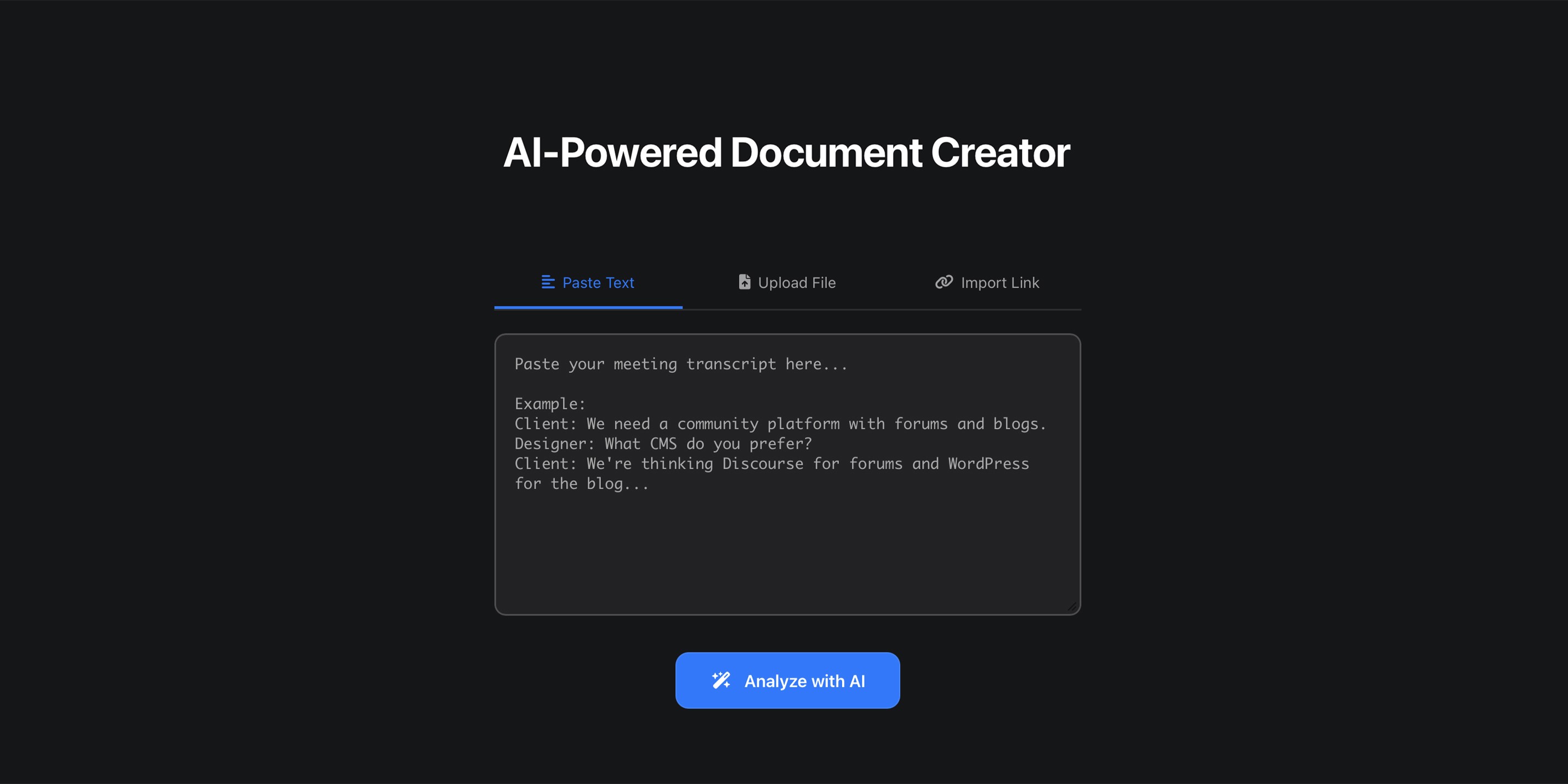
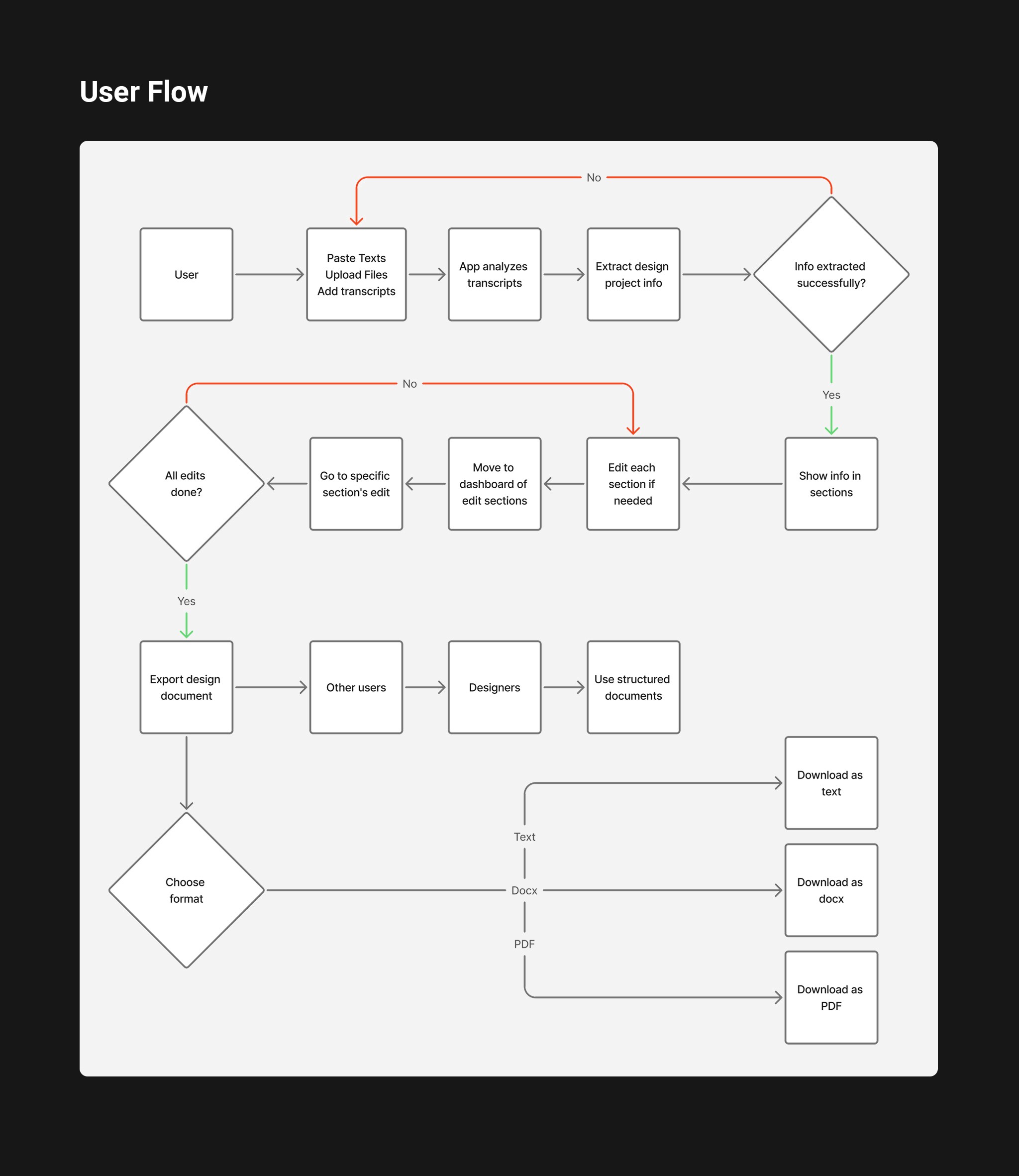
CX uploads or pastes the client meeting transcript.
The assistant analyzes and segments key information by topic.
Extracted content is previewed in an editable structured format in a dashboard.
CX reviews, corrects, or adds missing details.
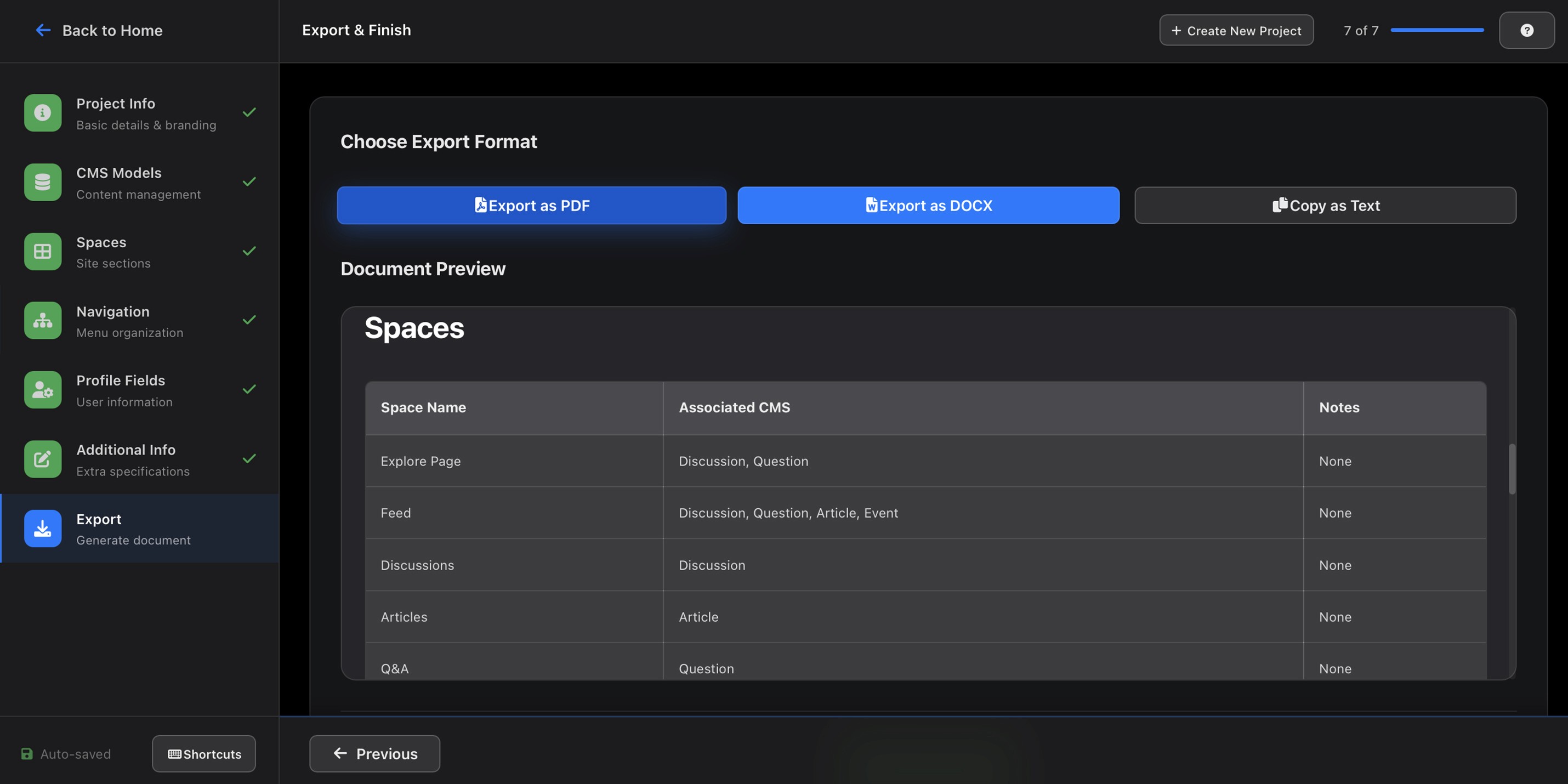
Final approved document is exported as a ready-to-use design brief for the design team.
Designing Process
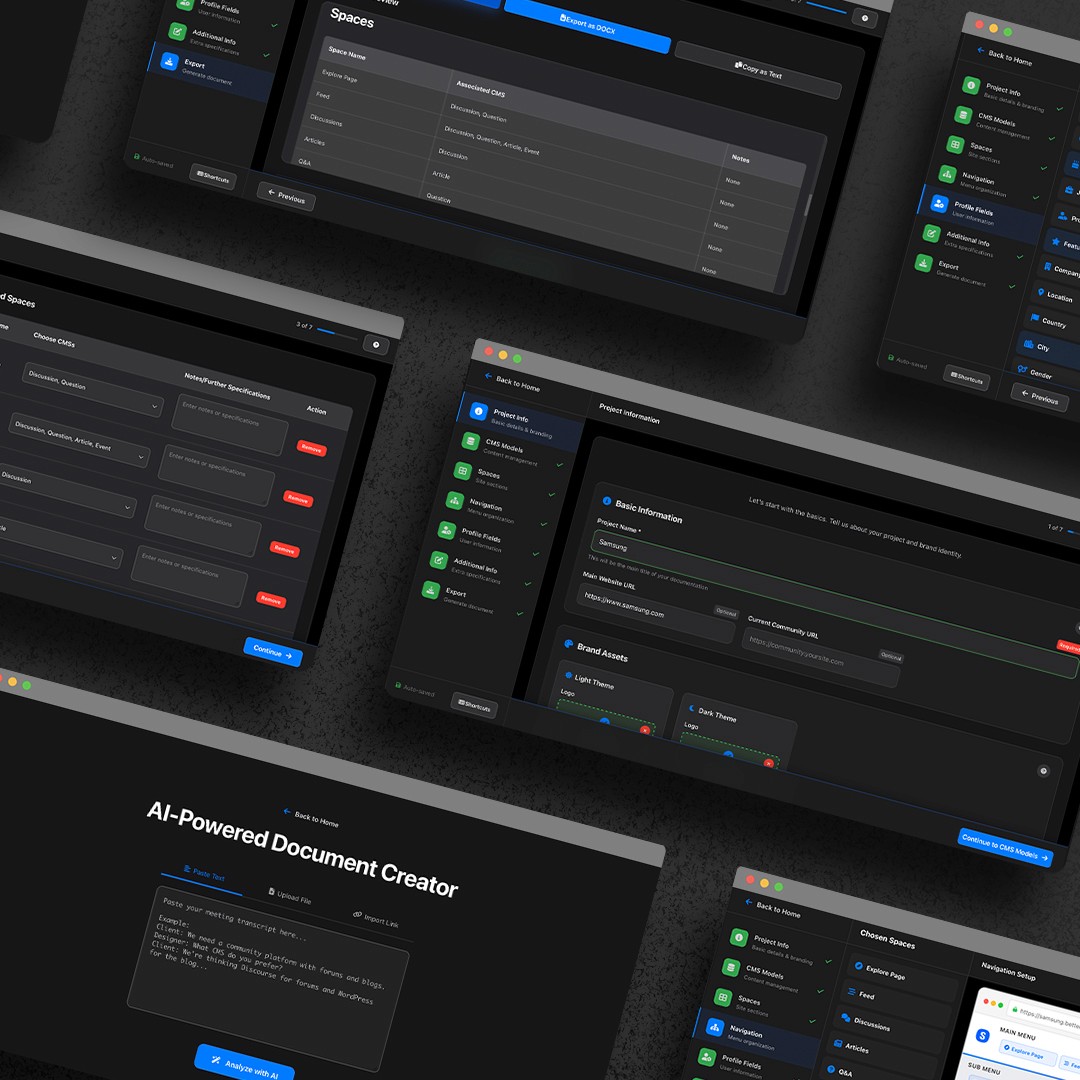
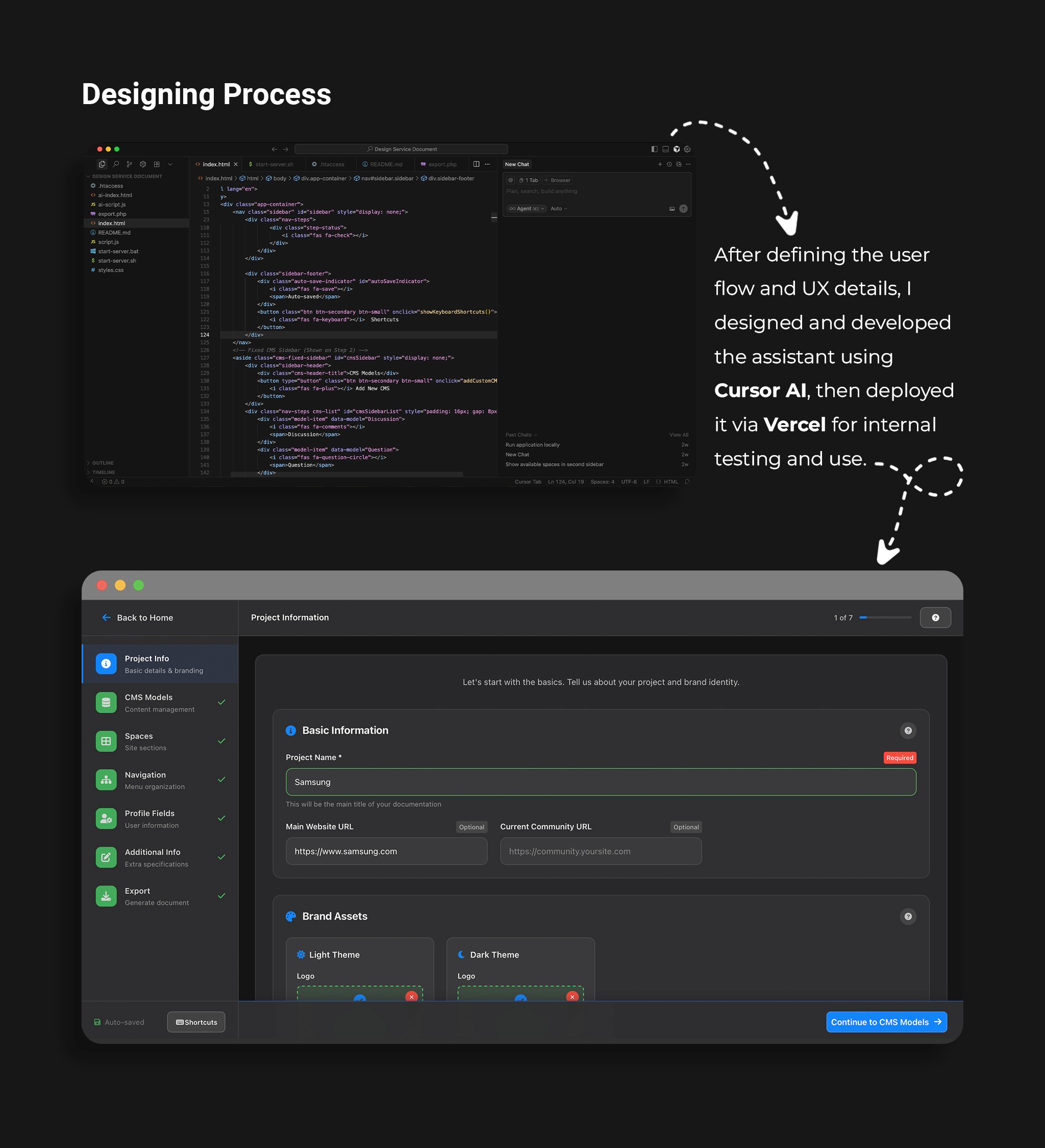
I designed and developed the assistant interface and workflow using Cursor AI and Vercel.
Iterations focused on clarity of output, readability, and reducing manual review steps.
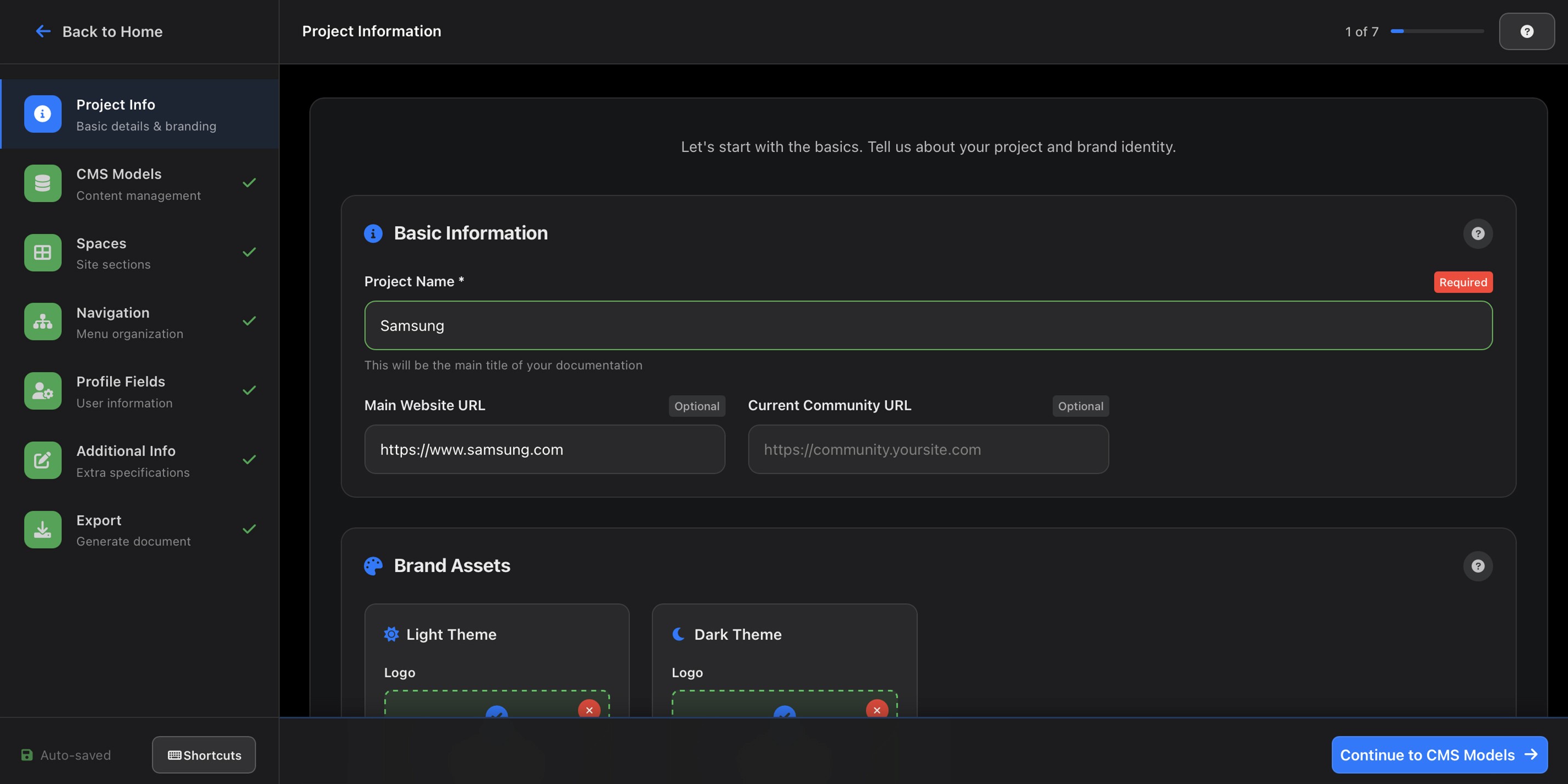
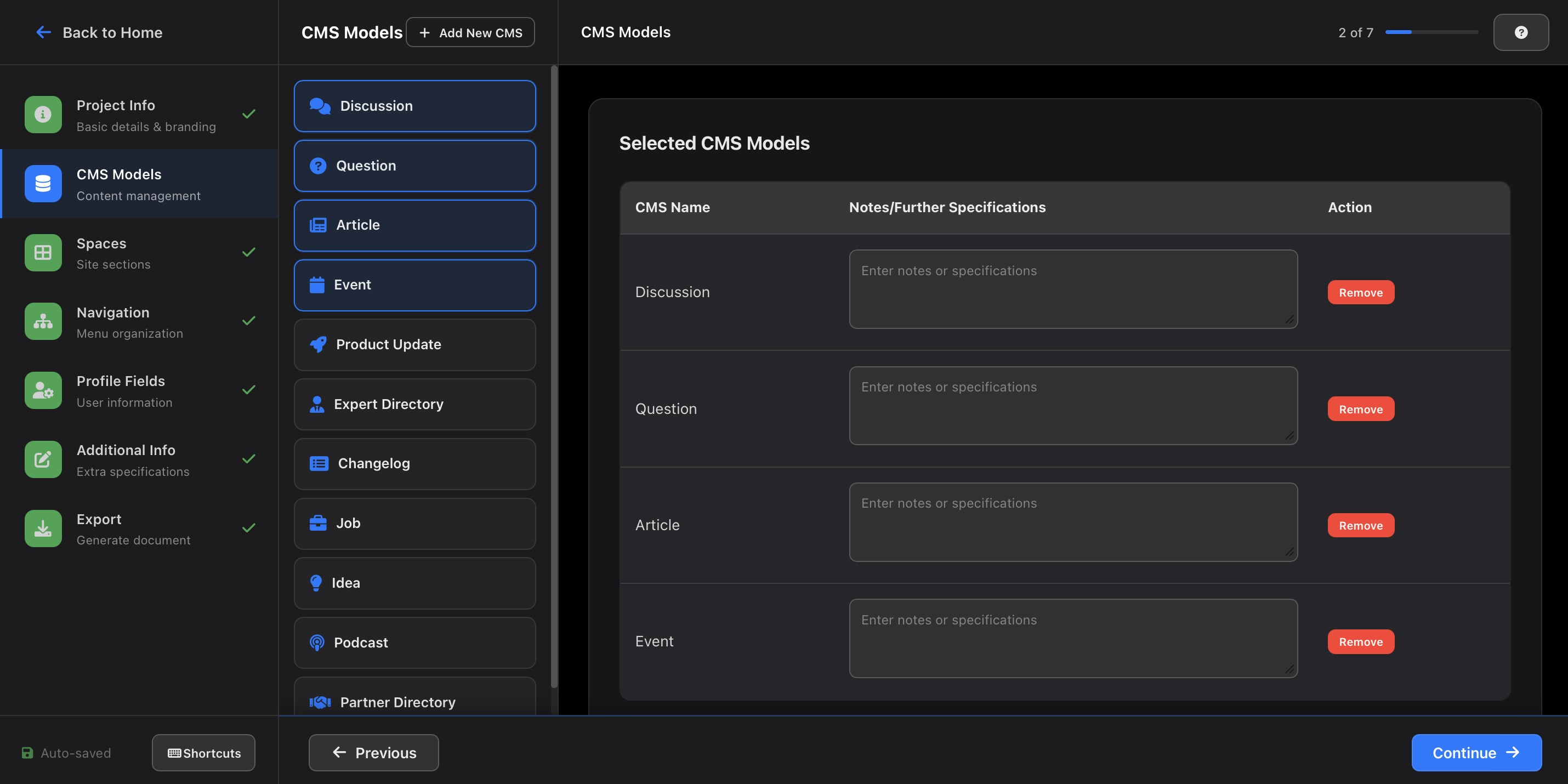
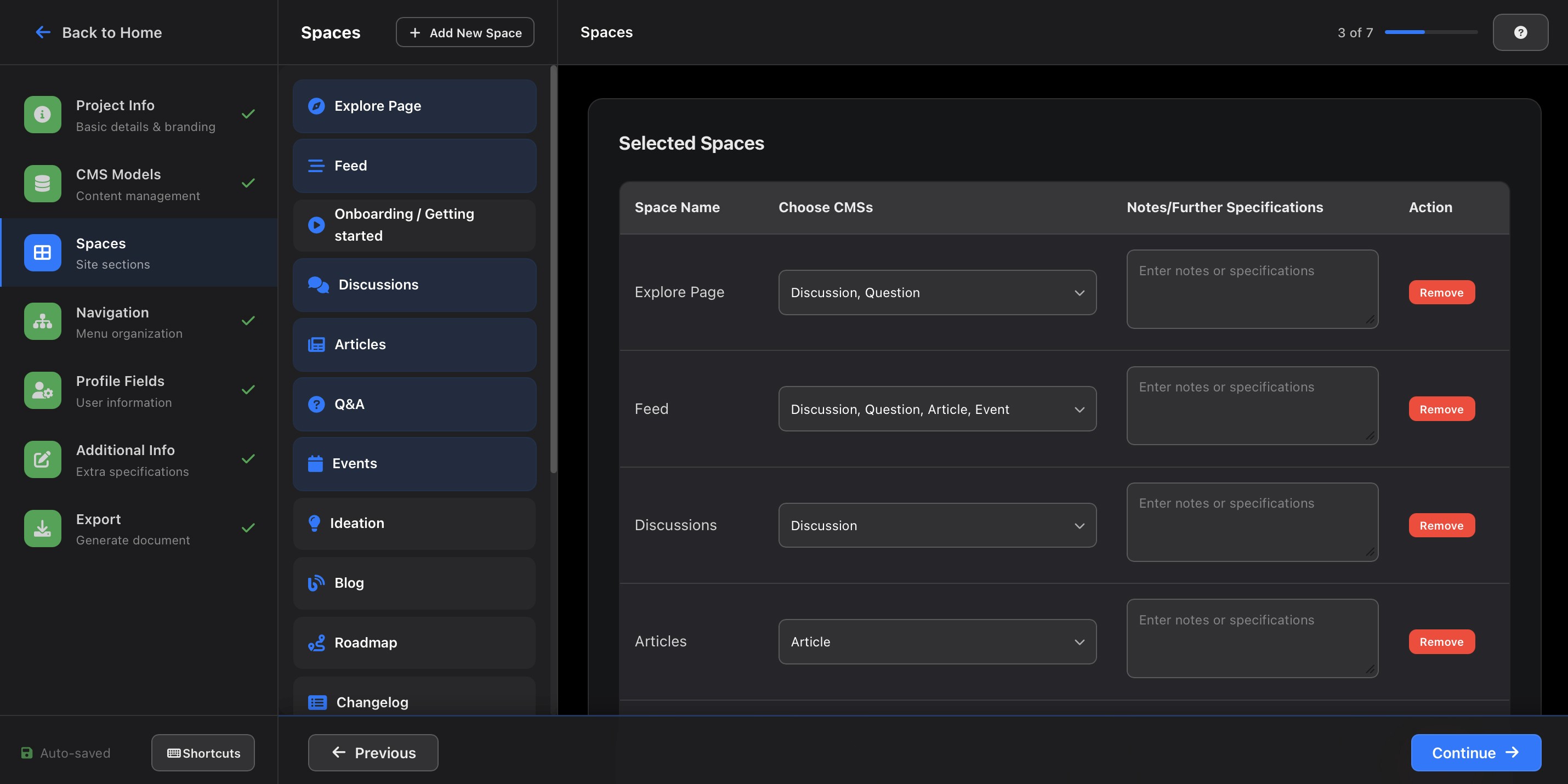
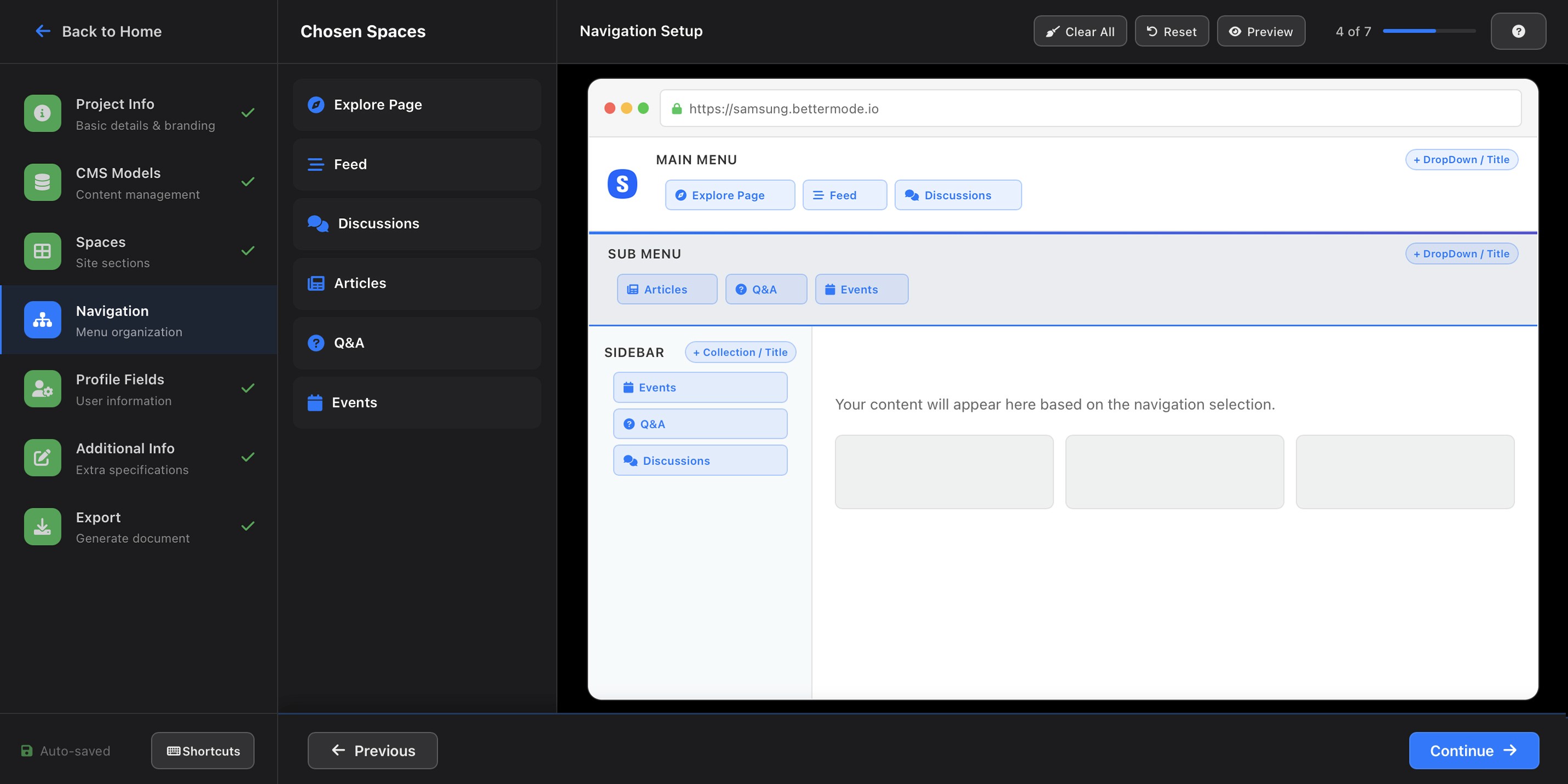
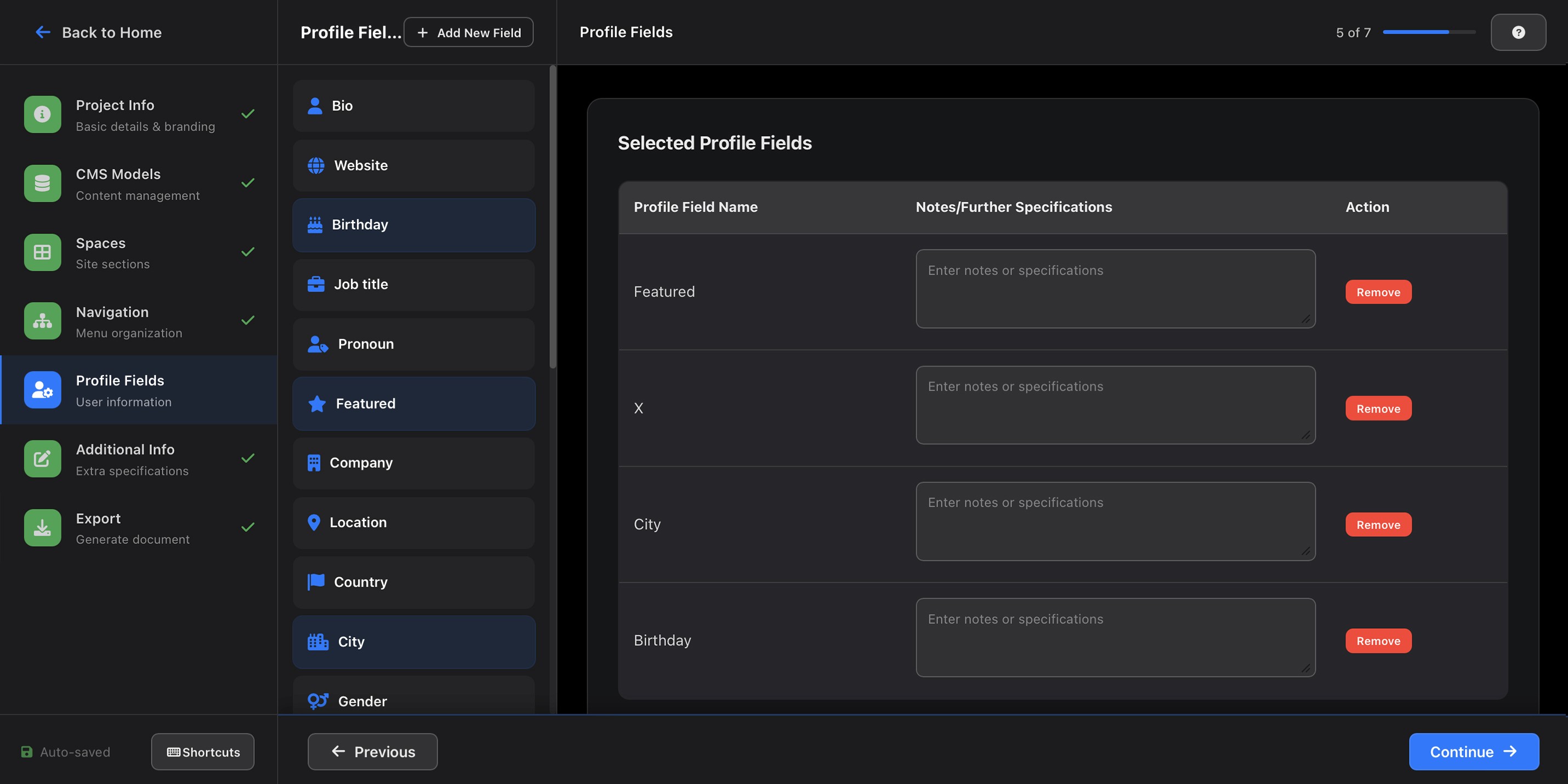
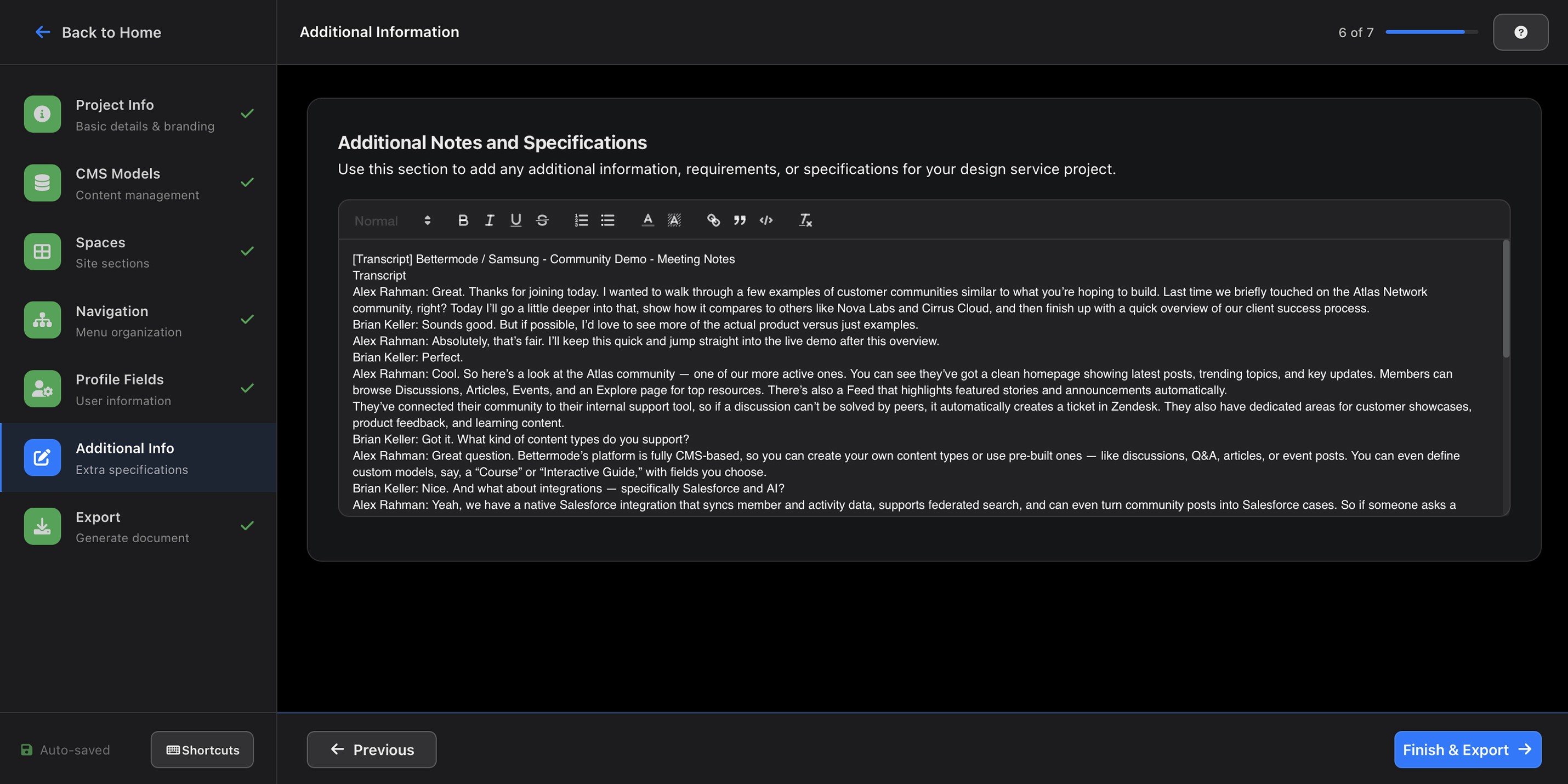
I created a clear, hierarchical format with sections like:
Brand Identity
CMSs
Spaces
Navigation
Profile Fields
Additional Info & Feature Requirements
Export
The tool was tested using actual client transcripts to ensure language flexibility and domain adaptability.
User Testing Process
After the first functional version was built, I ran two rounds of internal testing with 3 CX team members using anonymized transcripts from real past client calls.
Round 1 focused on extraction accuracy. The main failure mode: the tool performed well on explicit information ('brand color is #2D4A8F') but struggled with implied information ('we want it to feel like a premium fintech app'). This led directly to the addition of the 'context notes' field, giving CX a place to pre-load qualitative framing before processing.
Round 2 focused on the review and editing experience. Testers found the output structure clear but flagged that the 'Additional Info' section was a catch-all that often contained the most important nuances buried under less important details. We restructured it into two distinct fields: 'Feature Priorities' and 'Explicitly Rejected Directions', the latter being one of the most referenced sections by designers in post-launch feedback.
Success Metrics
We measured impact across three dimensions in the 6 weeks following full team adoption.
Documentation time: Tracked by asking CX members to log time spent on documentation for 3 weeks before and 3 weeks after tool adoption. Before: median of 68 minutes per client. After: median of 17 minutes, a reduction of approximately 75% for standard onboarding calls. For complex or sensitive clients, some team members continued to write manually, which we expected and didn't try to change.
Document completeness: The design team tracked how many incoming briefs required a follow-up clarification request before work could begin. In the 6 weeks before the tool: 9 out of 22 briefs (41%) required at least one follow-up. In the 6 weeks after: 4 out of 19 briefs (21%) required follow-up. An improvement, but not as dramatic as we hoped, which prompted a second round of refinement to the tool's handling of brand identity sections, where gaps were still most common.
One metric that didn't move as expected: We anticipated that 'design team onboarding time per project' would decrease significantly. In practice, the time saving was modest, approximately 15%, not the 30–40% we'd projected. Post-hoc interviews with designers revealed the reason: even with better briefs, designers still scheduled a short kickoff call with CX before starting. The brief improved confidence and reduced surprises, but didn't eliminate the human touchpoint. We considered this a realistic outcome, the tool was meant to support the process, not replace the relationship.
Key Insights
Terminology matters more than structure: The biggest source of AI extraction errors wasn't ambiguous language, it was terminology mismatch. When clients used their own vocabulary ('hubs,' 'rooms,' 'boards') instead of Bettermode's terms, the AI misclassified content. Adding a terminology mapping layer reduced this error category by roughly 60%.
The review step is a feature, not a workaround: We initially worried that requiring human review would undermine the tool's time-saving value. In practice, CX members reported that reviewing an AI-generated draft was significantly less cognitively demanding than writing from scratch, even when they made substantial edits. The draft gave them something to react to rather than something to create, which turned out to be the real efficiency gain.
Not everything should be automated: Two CX members consistently chose to write certain sections manually, specifically, sections capturing client personality and relationship context. Rather than trying to automate these, we marked them as 'optional AI-assisted' with manual input preferred. Respecting this boundary increased overall trust in the tool.
Iteration and Improvement
Iteratively refined the assistant based on CX feedback and real transcript data.
The most significant iteration cycle was triggered by a failure, not feedback. Three weeks after launch, one CX member submitted an AI-generated brief for a client that turned out to have given misleading information during the call, they said they wanted a 'minimal' design but meant minimal compared to their current site, which was actually very feature-heavy. The brief reflected what the client said literally, not what they meant contextually.
This wasn't an AI failure, it was a process gap. No tool can catch deliberate misdirection or contextual nuance the CX rep didn't surface. We responded by adding a mandatory 'red flags or ambiguities noticed during the call' field, giving CX a structured place to record their own doubts. This field became one of the most valued parts of the brief by the design team, precisely because it surfaced what the transcript couldn't.
Outcome and Future Enhancements
A reliable, scalable AI workflow now saving hours weekly and improving inter-team collaboration.
Documentation time fell by approximately 75% for standard calls — significantly exceeding our initial 40% target, though the impact on downstream design onboarding was more modest than projected.
The assistant is now integrated into the CX team’s workflow, generating consistent, complete design briefs in minutes instead of hours.
It has become a trusted internal tool, bridging the gap between client insights and design execution.
Planned enhancements include integrating it with the internal CMS for automatic client profile updates and exploring voice-to-text processing for direct real-time meeting integration.
Below are screenshots of the AI assistant in action: